Beach Dune Bermed Starter Home
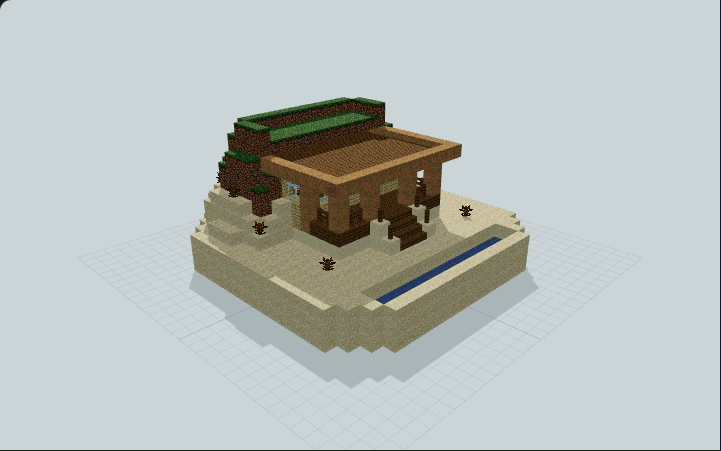
Raised birch cabin beside a small sand-bound sea inlet, with a shaded porch, two-step beach stair and a crescent sand-and-grass berm behind its roof, built for a dry shoreline base in survival worlds
WorldEdit .schem available. No native .litematic file for this build.
3D Preview
 Loading 3D preview…
Minecraft Java Edition · Sponge .schem
Verification details
No revision-bound verification record is currently published for this build.
A 3D preview shows appearance, not game behavior. Bedrock conversion and Litematica compatibility are not verified unless separately recorded.
Build Facts
JSON fact sheet- Dimensions
- 21 x 11 x 21 blocks
- Compiled blocks
- 2,173
- Category
- starter house
- Updated
Curated by MinePilot from a CraftDAG component plan. Canonical page: https://www.myminepilot.com/builds/beach-dune-bermed-starter-home
Materials
2,173 blocksPlaced block counts · stack equivalents, not crafting ingredients. Expand for exact BlockStates.
Sand1,30120×64 + 21
minecraft:sand× 1,301 Dirt2403×64 + 48
minecraft:dirt× 240Smooth Sandstone119Placed blocks
minecraft:smooth_sandstone× 119 Spruce Slab1101×64 + 46
minecraft:spruce_slab[type=bottom,waterlogged=false]× 110 Birch Planks941×64 + 30
minecraft:birch_planks× 94 Spruce Planks781×64 + 14
minecraft:spruce_planks× 78 Grass Block771×64 + 13
minecraft:grass_block[snowy=false]× 77Stripped Jungle Log6161 / 64 stack
minecraft:stripped_jungle_log[axis=y]× 28minecraft:stripped_jungle_log[axis=z]× 20minecraft:stripped_jungle_log[axis=x]× 13 Water30Placed blocks
minecraft:water[level=0]× 30 Glass Pane1616 / 64 stack
minecraft:glass_pane× 16 Spruce Fence1212 / 64 stack
minecraft:spruce_fence[east=false,north=false,south=false,waterlogged=false,west=false]× 4minecraft:spruce_fence[east=false,north=false,south=false,waterlogged=false,west=true]× 2minecraft:spruce_fence[east=false,north=false,south=true,waterlogged=false,west=false]× 2minecraft:spruce_fence[east=false,north=true,south=false,waterlogged=false,west=false]× 2minecraft:spruce_fence[east=true,north=false,south=false,waterlogged=false,west=false]× 2Dead Bush8Placed blocks
minecraft:dead_bush× 8 Lantern66 / 64 stack
minecraft:lantern[hanging=true,waterlogged=false]× 6 Spruce Stairs66 / 64 stack
minecraft:spruce_stairs[facing=south,half=bottom,shape=straight,waterlogged=false]× 6Light Blue Carpet33 / 64 stack
minecraft:light_blue_carpet× 3Short Grass3Placed blocks
minecraft:short_grass× 3 Chest22 / 64 stack
minecraft:chest[facing=west,type=single,waterlogged=false]× 2Jungle Door22 / 64 stack
minecraft:jungle_door[facing=north,half=lower,hinge=left]× 1minecraft:jungle_door[facing=north,half=upper,hinge=left]× 1White Bed2Unstackable
minecraft:white_bed[facing=north,occupied=false,part=foot]× 1minecraft:white_bed[facing=north,occupied=false,part=head]× 1 Barrel11 / 64 stack
minecraft:barrel[facing=west,open=false]× 1Crafting Table11 / 64 stack
minecraft:crafting_table× 1 Furnace11 / 64 stack
minecraft:furnace[facing=north,lit=false]× 1Layer Guide
11 layersImport Guide
Java Edition- Download the protected
.schemfile for Beach Dune Bermed Starter Home. - Place it in your WorldEdit or Litematica schematics folder.
- Load the schematic in-game, preview placement, then paste or build layer by layer.
Finding related builds…