Orbital Citadel — Giant Explorable Space Fortress
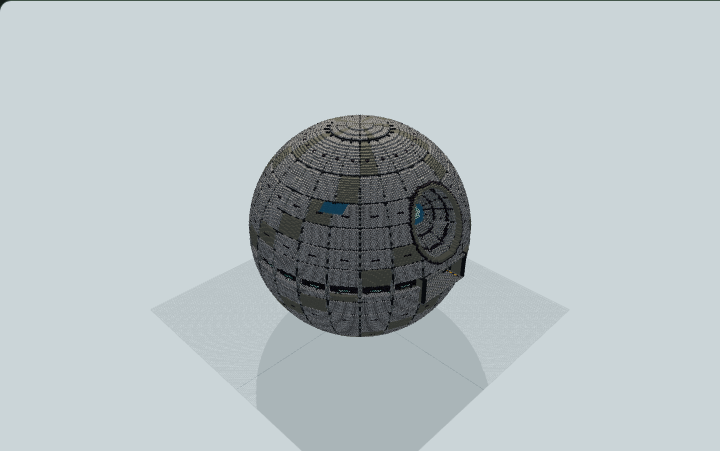
Explore a giant orbital fortress with layered armor, a recessed energy array, an open hangar and seven connected zones across five decks for a sci-fi server or adventure map.
WorldEdit .schem available. No native .litematic file for this build.
3D Preview
 Loading 3D preview…
Minecraft Java Edition · Sponge .schem
Verification details
No revision-bound verification record is currently published for this build.
A 3D preview shows appearance, not game behavior. Bedrock conversion and Litematica compatibility are not verified unless separately recorded.
Exploring the Orbital Citadel
A 160 × 160 × 160 orbital fortress with five connected decks. Enter through the large hangar on the north face.
- 1
Choose a clear site
Reserve a clear 160 × 160 × 160 volume with enough world height for the sphere. The schematic contains the station; it has no terrain base.
- 2
Enter the hangar
The north hangar floor is at local Y64. Approach around local X80, Z2, then cross the landing pad and pass through the rear opening near X80, Z53.
- 3
Find the stair tower
From the main deck, walk around the guarded reactor well to the southeast stair tower near local X104–119, Z104–117. Physical stairs connect Y44, 64, 84, 104 and 124.
- 4
Explore the zones
Engineering is on Y44; the hangar and security are on Y64; crew quarters and briefing are on Y84; tactical operations are on Y104; command and the east observation window are on Y124.
- 5
Visit the reactor
Use the guarded platforms and east service bridges on the lower four decks to approach the reactor. Keep inside the railings around the central drop.
The reactor and recessed energy array are architectural features. This build does not contain a functioning Redstone weapon or a teleporting elevator.
Build Facts
JSON fact sheet- Dimensions
- 160 x 160 x 160 blocks
- Compiled blocks
- 290,692
- Category
- large build
- Updated
Generated from analytic-shell-and-semantic-rooms through local-orbital-1+craftdag-core0.2.7 (hybrid route). Canonical page: https://www.myminepilot.com/builds/orbital-citadel-space-fortress
Materials
290,692 blocksPlaced block counts · stack equivalents, not crafting ingredients. Expand for exact BlockStates.
Smooth Stone167,636Placed blocks
minecraft:smooth_stone× 167,636Light Gray Concrete43,704682×64 + 56
minecraft:light_gray_concrete× 43,704Gray Concrete27,004421×64 + 60
minecraft:gray_concrete× 27,004Polished Andesite26,842Placed blocks
minecraft:polished_andesite× 26,842Polished Blackstone11,027Placed blocks
minecraft:polished_blackstone× 11,027Sea Lantern7,053Placed blocks
minecraft:sea_lantern× 7,053Cyan Stained Glass4,64472×64 + 36
minecraft:cyan_stained_glass× 4,644 Iron Bars1,58424×64 + 48
minecraft:iron_bars[east=true,north=true,south=true,waterlogged=false,west=true]× 1,584 Stone Bricks5949×64 + 18
minecraft:stone_bricks× 594 Stone Brick Stairs2403×64 + 48
minecraft:stone_brick_stairs[facing=east,half=bottom,shape=straight,waterlogged=false]× 120minecraft:stone_brick_stairs[facing=west,half=bottom,shape=straight,waterlogged=false]× 120Copper Block1081×64 + 44
minecraft:copper_block× 108 White Concrete761×64 + 12
minecraft:white_concrete× 76 Barrel6060 / 64 stack
minecraft:barrel[facing=east,open=false]× 60Yellow Concrete4848 / 64 stack
minecraft:yellow_concrete× 48Blue Concrete3030 / 64 stack
minecraft:blue_concrete× 30Polished Blackstone Brick Stairs2020 / 64 stack
minecraft:polished_blackstone_brick_stairs[facing=north,half=bottom,shape=straight,waterlogged=false]× 20White Bed20Unstackable
minecraft:white_bed[facing=east,occupied=false,part=foot]× 10minecraft:white_bed[facing=east,occupied=false,part=head]× 10Crafting Table11 / 64 stack
minecraft:crafting_table× 1 Furnace11 / 64 stack
minecraft:furnace[facing=north,lit=false]× 1Layer Guide
160 layersShowing the first 12 layers. Open the playground for the full interactive layer slider.
Import Guide
Java Edition- Download the protected
.schemfile for Orbital Citadel — Giant Explorable Space Fortress. - Place it in your WorldEdit or Litematica schematics folder.
- Load the schematic in-game, preview placement, then paste or build layer by layer.
Finding related builds…