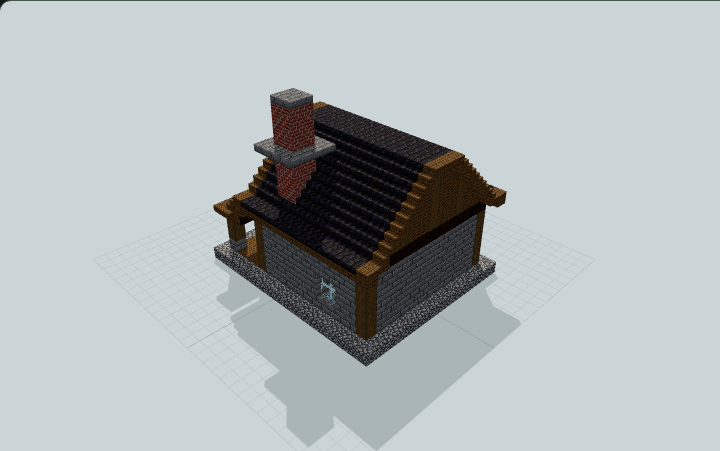
Scribe's Copying House and Archive
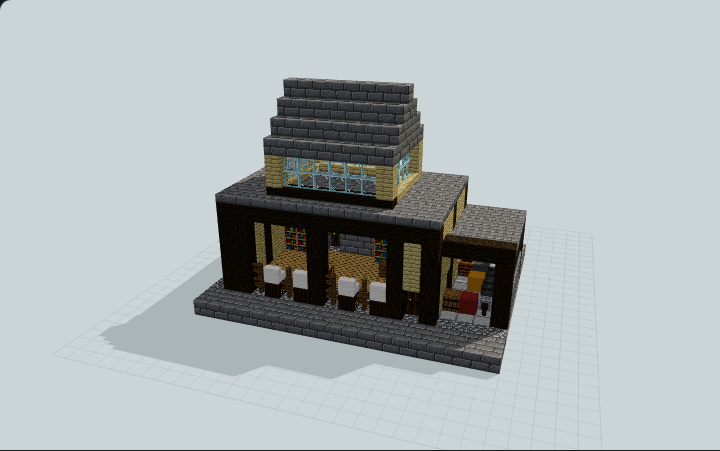
A birch-and-timber scriptorium with a glazed clerestory roof, four copying desks in a street-lit bay, an open pigment lean-to and a locked stone archive, for village roleplay.
WorldEdit .schem available. No native .litematic file for this build.
3D Preview
 Loading 3D preview…
Minecraft Java Edition · Sponge .schem
Verification details
No revision-bound verification record is currently published for this build.
A 3D preview shows appearance, not game behavior. Bedrock conversion and Litematica compatibility are not verified unless separately recorded.
Build Facts
JSON fact sheet- Dimensions
- 19 x 15 x 16 blocks
- Compiled blocks
- 1,088
- Category
- other
- Updated
Curated by MinePilot from a CraftDAG component plan. Canonical page: https://www.myminepilot.com/builds/medieval-scribes-copying-house
Materials
1,088 blocksPlaced block counts · stack equivalents, not crafting ingredients. Expand for exact BlockStates.
 Stone Bricks3024×64 + 46
minecraft:stone_bricks× 302 Stone Brick Slab1602×64 + 32
minecraft:stone_brick_slab[type=bottom]× 160 Cobblestone1322×64 + 4
minecraft:cobblestone× 132 Birch Planks1211×64 + 57
minecraft:birch_planks× 121 Oak Planks1021×64 + 38
minecraft:oak_planks× 102 Dark Oak Log881×64 + 24
minecraft:dark_oak_log[axis=y]× 48minecraft:dark_oak_log[axis=x]× 32minecraft:dark_oak_log[axis=z]× 8 Bookshelf5353 / 64 stack
minecraft:bookshelf× 53 Glass Pane4444 / 64 stack
minecraft:glass_pane× 44 Smooth Stone32Placed blocks
minecraft:smooth_stone× 32 Iron Bars99 / 64 stack
minecraft:iron_bars× 9 Spruce Fence88 / 64 stack
minecraft:spruce_fence× 8 Dark Oak Door66 / 64 stack
minecraft:dark_oak_door[facing=north,half=lower,hinge=left]× 2minecraft:dark_oak_door[facing=north,half=upper,hinge=left]× 2minecraft:dark_oak_door[facing=west,half=lower,hinge=left]× 1minecraft:dark_oak_door[facing=west,half=upper,hinge=left]× 1Cartography Table4Placed blocks
minecraft:cartography_table× 4Smooth Quartz Stairs44 / 64 stack
minecraft:smooth_quartz_stairs[facing=north,half=bottom,shape=straight]× 4 Spruce Slab44 / 64 stack
minecraft:spruce_slab[type=bottom]× 4 Barrel33 / 64 stack
minecraft:barrel[facing=up]× 3 Lantern33 / 64 stack
minecraft:lantern× 3 Spruce Planks33 / 64 stack
minecraft:spruce_planks× 3Cauldron2Placed blocks
minecraft:cauldron× 2Smooth Stone Slab22 / 64 stack
minecraft:smooth_stone_slab[type=bottom]× 2Composter1Placed blocks
minecraft:composter× 1Cyan Terracotta11 / 64 stack
minecraft:cyan_terracotta× 1Grindstone1Placed blocks
minecraft:grindstone[face=floor,facing=east]× 1 Red Terracotta11 / 64 stack
minecraft:red_terracotta× 1 Smithing Table1Placed blocks
minecraft:smithing_table× 1Yellow Terracotta11 / 64 stack
minecraft:yellow_terracotta× 1Layer Guide
14 layersShowing the first 12 layers. Open the playground for the full interactive layer slider.
Import Guide
Java Edition- Download the protected
.schemfile for Scribe's Copying House and Archive. - Place it in your WorldEdit or Litematica schematics folder.
- Load the schematic in-game, preview placement, then paste or build layer by layer.
Finding related builds…