
Black-Box Playhouse With Technical Bridge And Backstage Wing
A community black-box playhouse with a raised stage, raked seating, a public lobby, backstage rooms, and an accessible technical bridge for a city roleplay server.
WorldEdit .schem available. No native .litematic file for this build.
3D Preview
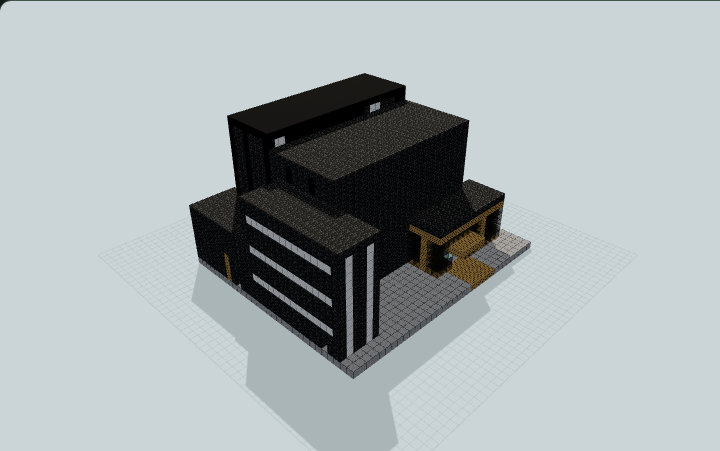 Loading 3D preview…
Minecraft Java Edition · Sponge .schem
Verification details
No revision-bound verification record is currently published for this build.
A 3D preview shows appearance, not game behavior. Bedrock conversion and Litematica compatibility are not verified unless separately recorded.
Build Facts
JSON fact sheet- Dimensions
- 35 x 22 x 30 blocks
- Compiled blocks
- 4,597
- Category
- other
- Updated
Generated from candidate-local-python through direct-voxel-plan@0.1 (semantic route). Canonical page: https://www.myminepilot.com/builds/urban-black-box-playhouse
Materials
4,597 blocksPlaced block counts · stack equivalents, not crafting ingredients. Expand for exact BlockStates.
 Deepslate Tiles2,102Placed blocks
minecraft:deepslate_tiles× 2,102 Smooth Stone808Placed blocks
minecraft:smooth_stone× 808 Black Concrete79012×64 + 22
minecraft:black_concrete× 790 Oak Planks3866×64 + 2
minecraft:oak_planks× 386 Iron Block2814×64 + 25
minecraft:iron_block× 281Black Stained Glass821×64 + 18
minecraft:black_stained_glass× 82Black Stained Glass Pane6262 / 64 stack
minecraft:black_stained_glass_pane× 62Polished Andesite Stairs5757 / 64 stack
minecraft:polished_andesite_stairs[facing=south,half=bottom,shape=straight,waterlogged=false]× 51minecraft:polished_andesite_stairs[facing=west,half=bottom,shape=straight,waterlogged=false]× 6Iron Door2222 / 64 stack
minecraft:iron_door[facing=west,half=lower,hinge=left,open=false,powered=false]× 4minecraft:iron_door[facing=west,half=upper,hinge=left,open=false,powered=false]× 4minecraft:iron_door[facing=east,half=lower,hinge=left,open=false,powered=false]× 3minecraft:iron_door[facing=east,half=upper,hinge=left,open=false,powered=false]× 3minecraft:iron_door[facing=north,half=lower,hinge=left,open=false,powered=false]× 3minecraft:iron_door[facing=north,half=upper,hinge=left,open=false,powered=false]× 3minecraft:iron_door[facing=south,half=lower,hinge=left,open=false,powered=false]× 1minecraft:iron_door[facing=south,half=upper,hinge=left,open=false,powered=false]× 1 Sea Lantern7Placed blocks
minecraft:sea_lantern× 7Layer Guide
20 layersShowing the first 12 layers. Open the playground for the full interactive layer slider.
Import Guide
Java Edition- Download the protected
.schemfile for Black-Box Playhouse With Technical Bridge And Backstage Wing. - Place it in your WorldEdit or Litematica schematics folder.
- Load the schematic in-game, preview placement, then paste or build layer by layer.
Finding related builds…


