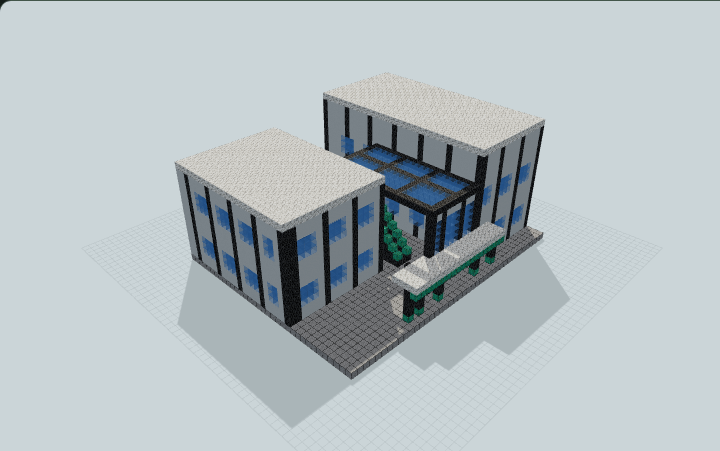
Asymmetric L-Wing City Hall and Council Atrium
Asymmetric L-wing city hall with a glazed council atrium, public colonnade, debating chamber, offices, archives, and accessible upper rooms for city roleplay.
WorldEdit .schem available. No native .litematic file for this build.
3D Preview
 Loading 3D preview…
Minecraft Java Edition · Sponge .schem
Verification details
No revision-bound verification record is currently published for this build.
A 3D preview shows appearance, not game behavior. Bedrock conversion and Litematica compatibility are not verified unless separately recorded.
Build Facts
JSON fact sheet- Dimensions
- 42 x 25 x 34 blocks
- Compiled blocks
- 6,393
- Category
- other
- Updated
Generated from candidate-local-python through direct-voxel-plan@0.1 (semantic route). Canonical page: https://www.myminepilot.com/builds/urban-city-hall-council-atrium
Materials
6,393 blocksPlaced block counts · stack equivalents, not crafting ingredients. Expand for exact BlockStates.
 Smooth Stone2,162Placed blocks
minecraft:smooth_stone× 2,162 White Concrete1,66526×64 + 1
minecraft:white_concrete× 1,665Calcite93214×64 + 36
minecraft:calcite× 932 Polished Deepslate709Placed blocks
minecraft:polished_deepslate× 709Light Blue Stained Glass68710×64 + 47
minecraft:light_blue_stained_glass× 687 Dark Oak Planks951×64 + 31
minecraft:dark_oak_planks× 95 Bookshelf5656 / 64 stack
minecraft:bookshelf× 56Oxidized Copper43Placed blocks
minecraft:oxidized_copper× 43Polished Deepslate Stairs2323 / 64 stack
minecraft:polished_deepslate_stairs[facing=south,half=bottom,shape=straight,waterlogged=false]× 23 Dark Oak Door1818 / 64 stack
minecraft:dark_oak_door[facing=north,half=lower,hinge=left,open=false,powered=false]× 3minecraft:dark_oak_door[facing=north,half=upper,hinge=left,open=false,powered=false]× 3minecraft:dark_oak_door[facing=east,half=lower,hinge=left,open=false,powered=false]× 2minecraft:dark_oak_door[facing=east,half=upper,hinge=left,open=false,powered=false]× 2minecraft:dark_oak_door[facing=south,half=lower,hinge=left,open=false,powered=false]× 2minecraft:dark_oak_door[facing=south,half=upper,hinge=left,open=false,powered=false]× 2minecraft:dark_oak_door[facing=west,half=lower,hinge=left,open=false,powered=false]× 2minecraft:dark_oak_door[facing=west,half=upper,hinge=left,open=false,powered=false]× 2 Sea Lantern3Placed blocks
minecraft:sea_lantern× 3Layer Guide
19 layersShowing the first 12 layers. Open the playground for the full interactive layer slider.
Import Guide
Java Edition- Download the protected
.schemfile for Asymmetric L-Wing City Hall and Council Atrium. - Place it in your WorldEdit or Litematica schematics folder.
- Load the schematic in-game, preview placement, then paste or build layer by layer.
Finding related builds…