
Urban Local History Museum
Three themed history galleries encircle an open planted courtyard with a closed visitor loop, real exhibits, entrance portico, and upper gallery for city cultural districts.
WorldEdit .schem available. No native .litematic file for this build.
3D Preview
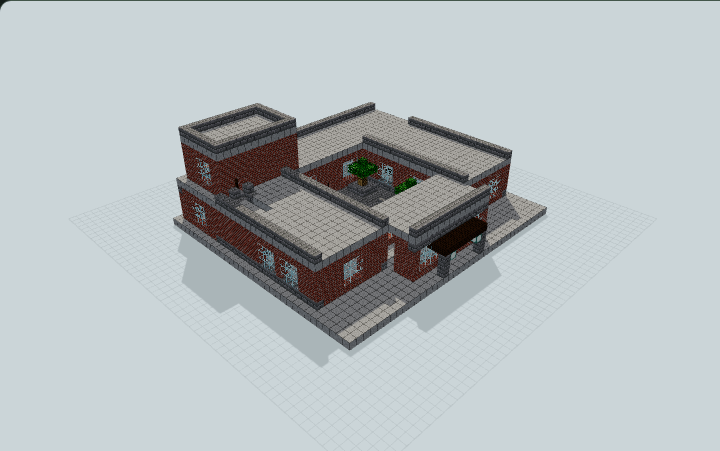 Loading 3D preview…
Minecraft Java Edition · Sponge .schem
Verification details
No revision-bound verification record is currently published for this build.
A 3D preview shows appearance, not game behavior. Bedrock conversion and Litematica compatibility are not verified unless separately recorded.
Build Facts
JSON fact sheet- Dimensions
- 38 x 20 x 34 blocks
- Compiled blocks
- 3,917
- Category
- other
- Updated
Generated from candidate-local-python through direct-voxel-plan@0.1 (semantic route). Canonical page: https://www.myminepilot.com/builds/urban-local-history-museum
Materials
3,917 blocksPlaced block counts · stack equivalents, not crafting ingredients. Expand for exact BlockStates.
 Smooth Stone1,921Placed blocks
minecraft:smooth_stone× 1,921 Bricks80712×64 + 39
minecraft:bricks× 807 Stone Bricks67410×64 + 34
minecraft:stone_bricks× 674 Glass2764×64 + 20
minecraft:glass× 276 Dark Oak Planks6060 / 64 stack
minecraft:dark_oak_planks× 60 Oak Leaves4040 / 64 stack
minecraft:oak_leaves× 40Copper Block2020 / 64 stack
minecraft:copper_block× 20 Bookshelf1818 / 64 stack
minecraft:bookshelf× 18 Dark Oak Door1818 / 64 stack
minecraft:dark_oak_door[facing=north,half=lower,hinge=left,open=false,powered=false]× 6minecraft:dark_oak_door[facing=north,half=upper,hinge=left,open=false,powered=false]× 6minecraft:dark_oak_door[facing=east,half=lower,hinge=left,open=false,powered=false]× 2minecraft:dark_oak_door[facing=east,half=upper,hinge=left,open=false,powered=false]× 2minecraft:dark_oak_door[facing=south,half=lower,hinge=left,open=false,powered=false]× 1minecraft:dark_oak_door[facing=south,half=upper,hinge=left,open=false,powered=false]× 1 Red Terracotta1818 / 64 stack
minecraft:red_terracotta× 18 Sea Lantern13Placed blocks
minecraft:sea_lantern× 13 Coarse Dirt8Placed blocks
minecraft:coarse_dirt× 8 Oak Log88 / 64 stack
minecraft:oak_log× 8 Stone Brick Stairs88 / 64 stack
minecraft:stone_brick_stairs[facing=south,half=bottom,shape=straight,waterlogged=false]× 6minecraft:stone_brick_stairs[facing=east,half=bottom,shape=straight,waterlogged=false]× 1minecraft:stone_brick_stairs[facing=west,half=bottom,shape=straight,waterlogged=false]× 1Brown Terracotta55 / 64 stack
minecraft:brown_terracotta× 5 White Wool55 / 64 stack
minecraft:white_wool× 5 Blue Wool44 / 64 stack
minecraft:blue_wool× 4 Gravel44 / 64 stack
minecraft:gravel× 4Blue Terracotta33 / 64 stack
minecraft:blue_terracotta× 3 Iron Block33 / 64 stack
minecraft:iron_block× 3Yellow Terracotta33 / 64 stack
minecraft:yellow_terracotta× 3 Red Wool11 / 64 stack
minecraft:red_wool× 1Layer Guide
14 layersShowing the first 12 layers. Open the playground for the full interactive layer slider.
Import Guide
Java Edition- Download the protected
.schemfile for Urban Local History Museum. - Place it in your WorldEdit or Litematica schematics folder.
- Load the schematic in-game, preview placement, then paste or build layer by layer.
Finding related builds…


