
Elevated Hay and Feed Store
A raised timber feed store with slatted walls, visible hay bays and a wide loading passage below, built for keeping supplies beside survival animal pens.
WorldEdit .schem available. No native .litematic file for this build.
3D Preview
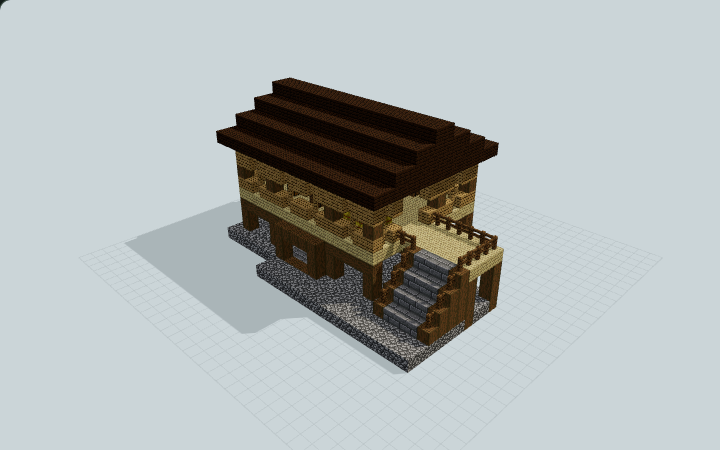 Loading 3D preview…
Minecraft Java Edition · Sponge .schem
Verification details
No revision-bound verification record is currently published for this build.
A 3D preview shows appearance, not game behavior. Bedrock conversion and Litematica compatibility are not verified unless separately recorded.
Use the Raised Feed Store
Keep the ground passage clear for manual loading and reach the upper hay bays by the supported side stair.
- 1
Place on level ground
Align the schematic foundation layer Y0 with your prepared ground surface. Leave both ends of the ground passage and the side stair approach open.
- 2
Reach the upper storage bay
Use the supported west stair and its upper landing. Keep its full width, headroom and connection to the raised storage deck clear.
- 3
Store feed manually
Stock the upper containers yourself and place or remove hay by hand. The visible hay blocks are building materials; containers include no inventory.
This is a storage building, not animal housing. No cart or animal entities, automatic feeding, redstone operation or native gameplay validation are supplied.
Build Facts
JSON fact sheet- Dimensions
- 23 x 13 x 17 blocks
- Compiled blocks
- 1,496
- Category
- other
- Updated
Curated by MinePilot from a CraftDAG component plan. Canonical page: https://www.myminepilot.com/builds/elevated-hay-feed-store
Materials
1,496 blocksPlaced block counts · stack equivalents, not crafting ingredients. Expand for exact BlockStates.
 Dark Oak Planks5769×64
minecraft:dark_oak_planks× 576 Cobblestone2403×64 + 48
minecraft:cobblestone× 240 Birch Planks2163×64 + 24
minecraft:birch_planks× 216Stripped Spruce Log1552×64 + 27
minecraft:stripped_spruce_log[axis=y]× 91minecraft:stripped_spruce_log[axis=x]× 64 Oak Planks1051×64 + 41
minecraft:oak_planks× 105 Stone Bricks1001×64 + 36
minecraft:stone_bricks× 100 Oak Fence5656 / 64 stack
minecraft:oak_fence× 56Hay Block2424 / 64 stack
minecraft:hay_block[axis=y]× 24 Spruce Fence1818 / 64 stack
minecraft:spruce_fence× 18 Barrel44 / 64 stack
minecraft:barrel[facing=north,open=false]× 2minecraft:barrel[facing=south,open=false]× 2 Chest22 / 64 stack
minecraft:chest[facing=north,type=single,waterlogged=false]× 1minecraft:chest[facing=south,type=single,waterlogged=false]× 1Layer Guide
13 layersShowing the first 12 layers. Open the playground for the full interactive layer slider.
Import Guide
Java Edition- Download the protected
.schemfile for Elevated Hay and Feed Store. - Place it in your WorldEdit or Litematica schematics folder.
- Load the schematic in-game, preview placement, then paste or build layer by layer.
Finding related builds…


