
Kyoto Machiya Merchant Townhouse
Full-block risers require repeated jumps to reach two upper rooms. A lattice shopfront, internal passage and rear garden complete this deep timber townhouse for a merchant roleplay home.
WorldEdit .schem available. No native .litematic file for this build.
3D Preview
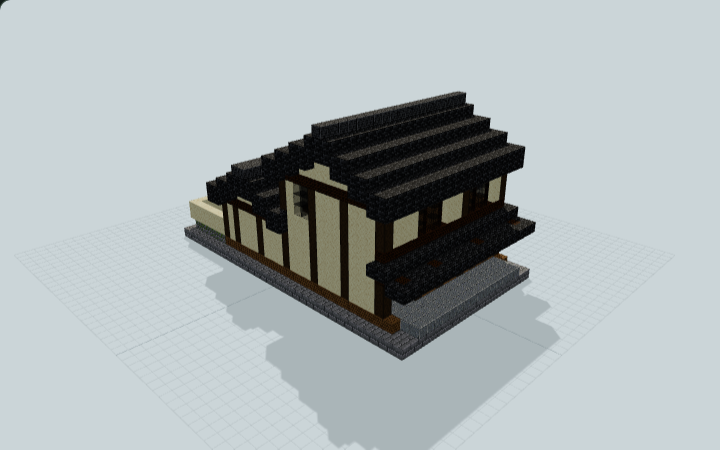 Loading 3D preview…
Minecraft Java Edition · Sponge .schem
Verification details
No revision-bound verification record is currently published for this build.
A 3D preview shows appearance, not game behavior. Bedrock conversion and Litematica compatibility are not verified unless separately recorded.
Placing the merchant townhouse
Set the low stone base on level ground with the shopfront facing north and leave the rear garden open to the sky.
- 1
Place the street edge
The customer doors and side-passage entrance face north, toward negative Z. Place the bottom stone layer at ground level and leave the approach clear.
- 2
Reach the household rooms
Open both customer doors. The east passage links shop and garden. The west route uses full-block risers; reaching both upper rooms requires repeated one-block jumps. Keep the risers, overhead space and landing clear.
- 3
Keep the rear garden open
The passage and rear room open into the pocket garden. Keep its center free of roofs and preserve the clear space above the chest lids.
Java Sponge .schem only. Native Minecraft/WorldEdit import and gameplay have not been tested.
Build Facts
JSON fact sheet- Dimensions
- 19 x 17 x 33 blocks
- Compiled blocks
- 3,302
- Category
- starter house
- Updated
Curated by MinePilot from a CraftDAG component plan. Canonical page: https://www.myminepilot.com/builds/japanese-machiya-merchant-townhouse
Materials
3,302 blocksPlaced block counts · stack equivalents, not crafting ingredients. Expand for exact BlockStates.
 Deepslate Tiles1,098Placed blocks
minecraft:deepslate_tiles× 1,098 Stone Bricks6279×64 + 51
minecraft:stone_bricks× 627 Spruce Planks5218×64 + 9
minecraft:spruce_planks× 521 Smooth Sandstone502Placed blocks
minecraft:smooth_sandstone× 502 Polished Andesite132Placed blocks
minecraft:polished_andesite× 132Stripped Dark Oak Log981×64 + 34
minecraft:stripped_dark_oak_log[axis=y]× 98 Dark Oak Planks941×64 + 30
minecraft:dark_oak_planks× 94 Polished Deepslate57Placed blocks
minecraft:polished_deepslate× 57 Gravel4747 / 64 stack
minecraft:gravel× 47Black Stained Glass3838 / 64 stack
minecraft:black_stained_glass× 38 Mossy Stone Bricks2929 / 64 stack
minecraft:mossy_stone_bricks× 29Dark Oak Fence2727 / 64 stack
minecraft:dark_oak_fence[east=false,north=false,south=false,waterlogged=false,west=false]× 27 Grass Block88 / 64 stack
minecraft:grass_block[snowy=false]× 8Torch66 / 64 stack
minecraft:wall_torch[facing=west]× 4minecraft:wall_torch[facing=east]× 2 Chest44 / 64 stack
minecraft:chest[facing=north,type=left,waterlogged=false]× 2minecraft:chest[facing=north,type=right,waterlogged=false]× 2 Dark Oak Door44 / 64 stack
minecraft:dark_oak_door[facing=north,half=lower,hinge=left,open=false,powered=false]× 1minecraft:dark_oak_door[facing=north,half=lower,hinge=right,open=false,powered=false]× 1minecraft:dark_oak_door[facing=north,half=upper,hinge=left,open=false,powered=false]× 1minecraft:dark_oak_door[facing=north,half=upper,hinge=right,open=false,powered=false]× 1White Bed4Unstackable
minecraft:white_bed[facing=north,occupied=false,part=foot]× 1minecraft:white_bed[facing=north,occupied=false,part=head]× 1minecraft:white_bed[facing=south,occupied=false,part=foot]× 1minecraft:white_bed[facing=south,occupied=false,part=head]× 1 Barrel22 / 64 stack
minecraft:barrel[facing=north,open=false]× 2 Oak Leaves22 / 64 stack
minecraft:oak_leaves[distance=1,persistent=true,waterlogged=false]× 2Crafting Table11 / 64 stack
minecraft:crafting_table× 1 Furnace11 / 64 stack
minecraft:furnace[facing=north,lit=false]× 1Layer Guide
17 layersShowing the first 12 layers. Open the playground for the full interactive layer slider.
Import Guide
Java Edition- Download the protected
.schemfile for Kyoto Machiya Merchant Townhouse. - Place it in your WorldEdit or Litematica schematics folder.
- Load the schematic in-game, preview placement, then paste or build layer by layer.
Finding related builds…


