
Roman Curia Senate Hall
A Roman-inspired brick senate hall with a shallow columned porch, opposing stepped bench tiers and an accessible raised presiding niche. Built for council roleplay.
WorldEdit .schem available. No native .litematic file for this build.
3D Preview
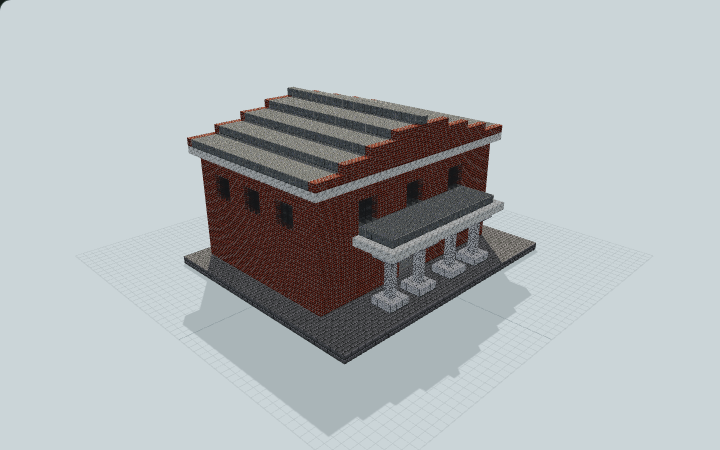 Loading 3D preview…
Minecraft Java Edition · Sponge .schem
Verification details
No revision-bound verification record is currently published for this build.
A 3D preview shows appearance, not game behavior. Bedrock conversion and Litematica compatibility are not verified unless separately recorded.
Quick Start
Use this original Roman-inspired civic chamber for creative council scenes. Its opposing stone bench tiers face a clear central aisle and raised rear presiding dais.
- 1
Enter the chamber
Approach from the north through the shallow pale porch and five-block-wide central entrance.
- 2
Reach the seats
Turn left or right from the center aisle and step up across the three opposing bench tiers. Each broad tier is an architectural seating platform.
- 3
Take the presiding position
Follow the aisle south, climb the two broad steps and stand on the raised rear dais beside the decorative podium.
A decorative creative or roleplay interior; it contains no redstone voting system, working scoreboard or automatic council mechanics.
Build Facts
JSON fact sheet- Dimensions
- 37 x 21 x 31 blocks
- Compiled blocks
- 6,300
- Category
- large build
- Updated
Curated by MinePilot from a CraftDAG component plan. Canonical page: https://www.myminepilot.com/builds/roman-curia-senate-hall
Materials
6,300 blocksPlaced block counts · stack equivalents, not crafting ingredients. Expand for exact BlockStates.
 Polished Andesite2,824Placed blocks
minecraft:polished_andesite× 2,824 Bricks1,41322×64 + 5
minecraft:bricks× 1,413 Stone Bricks1,07216×64 + 48
minecraft:stone_bricks× 1,072Polished Diorite501Placed blocks
minecraft:polished_diorite× 501Calcite3615×64 + 41
minecraft:calcite× 361Gray Stained Glass1081×64 + 44
minecraft:gray_stained_glass× 108Diorite20Placed blocks
minecraft:diorite× 20Chiseled Stone Bricks11 / 64 stack
minecraft:chiseled_stone_bricks× 1Layer Guide
21 layersShowing the first 12 layers. Open the playground for the full interactive layer slider.
Import Guide
Java Edition- Download the protected
.schemfile for Roman Curia Senate Hall. - Place it in your WorldEdit or Litematica schematics folder.
- Load the schematic in-game, preview placement, then paste or build layer by layer.
Finding related builds…


