
Public Aquarium with Underwater Viewing Gallery
An ocean pavilion with a faceted white-edged fin, panoramic reef window, kelp gallery and upper viewing bridge, designed for aquarium roleplay.
WorldEdit .schem available. No native .litematic file for this build.
3D Preview
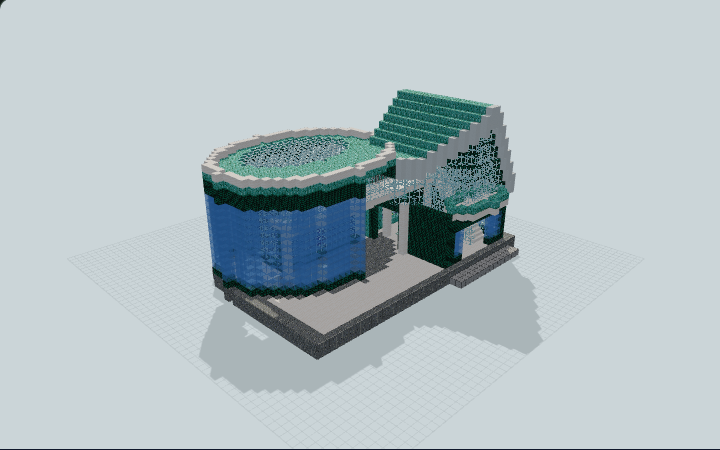 Loading 3D preview…
Minecraft Java Edition · Sponge .schem
Verification details
No revision-bound verification record is currently published for this build.
A 3D preview shows appearance, not game behavior. Bedrock conversion and Litematica compatibility are not verified unless separately recorded.
Quick Start
A public aquarium with sealed reef and kelp habitats, a dry viewing canyon and a protected upper bridge.
- 1
Arrive
Climb the shallow north entry apron and pass beneath the white portico into the ticket atrium.
- 2
View the reef
The broad rear opening leads to Gallery A in front of the panoramic reef window. Keep to the dry quartz visitor floor.
- 3
Visit the kelp canyon
Walk west of the reef to Gallery B between the reef side window and the smaller kelp forest tank.
- 4
Upper viewing
Return to the atrium and use the west staircase to the protected upper bridge. At the central viewing bay, the full-height tank glass forms the protective edge; stay on the dry quartz deck to look into the reef.
The schematic carries vanilla water, coral blocks and kelp plants, with no fish, mobs or entity data. Static architecture and native water evidence do not implement aquarium game mechanics.
Build Facts
JSON fact sheet- Dimensions
- 42 x 24 x 34 blocks
- Compiled blocks
- 8,500
- Category
- large build
- Updated
Curated by MinePilot from a CraftDAG component plan. Canonical page: https://www.myminepilot.com/builds/urban-aquarium-ocean-pavilion
Materials
8,500 blocksPlaced block counts · stack equivalents, not crafting ingredients. Expand for exact BlockStates.
 Polished Andesite1,565Placed blocks
minecraft:polished_andesite× 1,565 Dark Prismarine1,300Placed blocks
minecraft:dark_prismarine× 1,300 Water1,232Placed blocks
minecraft:water[level=0]× 1,232 Smooth Quartz1,196Placed blocks
minecraft:smooth_quartz× 1,196 Glass1,19418×64 + 42
minecraft:glass× 1,194 Prismarine Bricks1,02616×64 + 2
minecraft:prismarine_bricks× 1,026Light Blue Stained Glass4647×64 + 16
minecraft:light_blue_stained_glass× 464 Sand1472×64 + 19
minecraft:sand× 147Calcite6262 / 64 stack
minecraft:calcite× 62Kelp Plant53Placed blocks
minecraft:kelp_plant× 53 White Concrete5151 / 64 stack
minecraft:white_concrete× 51 Sandstone4848 / 64 stack
minecraft:sandstone× 48 Smooth Stone30Placed blocks
minecraft:smooth_stone× 30Quartz Stairs2727 / 64 stack
minecraft:quartz_stairs[facing=south,half=bottom,shape=straight,waterlogged=false]× 27 Iron Bars2626 / 64 stack
minecraft:iron_bars[east=true,north=false,south=false,waterlogged=false,west=true]× 13minecraft:iron_bars[east=true,north=false,south=true,waterlogged=false,west=true]× 13 Sea Lantern16Placed blocks
minecraft:sea_lantern× 16Stripped Warped Hyphae16Placed blocks
minecraft:stripped_warped_hyphae× 16Kelp13Placed blocks
minecraft:kelp[age=0]× 13Prismarine12Placed blocks
minecraft:prismarine× 12Brain Coral Block55 / 64 stack
minecraft:brain_coral_block× 5Horn Coral Block55 / 64 stack
minecraft:horn_coral_block× 5Bubble Coral Block33 / 64 stack
minecraft:bubble_coral_block× 3Fire Coral Block33 / 64 stack
minecraft:fire_coral_block× 3Tube Coral Block33 / 64 stack
minecraft:tube_coral_block× 3Warped Planks33 / 64 stack
minecraft:warped_planks× 3Layer Guide
24 layersShowing the first 12 layers. Open the playground for the full interactive layer slider.
Import Guide
Java Edition- Download the protected
.schemfile for Public Aquarium with Underwater Viewing Gallery. - Place it in your WorldEdit or Litematica schematics folder.
- Load the schematic in-game, preview placement, then paste or build layer by layer.
Finding related builds…


