
Open-Air Survival Trading Court
A U-shaped trading court with six covered workstation alcoves, a tall entry pavilion and rear service passage, useful for arranging a manual survival trading area.
WorldEdit .schem available. No native .litematic file for this build.
3D Preview
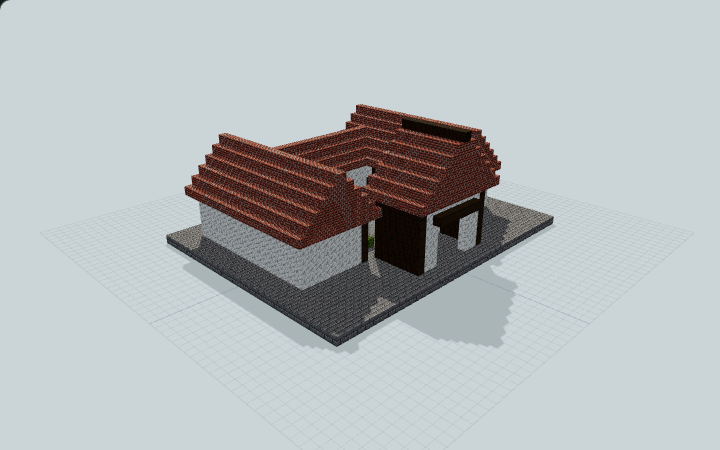 Loading 3D preview…
Minecraft Java Edition · Sponge .schem
Verification details
No revision-bound verification record is currently published for this build.
A 3D preview shows appearance, not game behavior. Bedrock conversion and Litematica compatibility are not verified unless separately recorded.
Arrange a Trading Court
Six profession workstations sit in open player-facing alcoves around a shared courtyard.
- 1
Enter the court
Place on level ground and enter through the north pavilion to the open central court.
- 2
Use the workstations
Walk into each of the three alcoves on each side to reach the six profession workstations and nearby barrels.
- 3
Service the rear wing
Use the continuous side passages and rear range to reach the reserve supply barrels.
No villagers or inventory are supplied. Villager AI, discounts, retention, transport and automation have not been validated.
Build Facts
JSON fact sheet- Dimensions
- 37 x 16 x 29 blocks
- Compiled blocks
- 3,863
- Category
- other
- Updated
Curated by MinePilot from a CraftDAG component plan. Canonical page: https://www.myminepilot.com/builds/open-air-villager-trading-court
Materials
3,863 blocksPlaced block counts · stack equivalents, not crafting ingredients. Expand for exact BlockStates.
 Bricks2,02831×64 + 44
minecraft:bricks× 2,028 Stone Bricks98315×64 + 23
minecraft:stone_bricks× 983Calcite5628×64 + 50
minecraft:calcite× 562Stripped Dark Oak Log1502×64 + 22
minecraft:stripped_dark_oak_log× 150 Polished Andesite90Placed blocks
minecraft:polished_andesite× 90 Bookshelf1212 / 64 stack
minecraft:bookshelf× 12 Barrel1010 / 64 stack
minecraft:barrel[facing=north,open=false]× 4minecraft:barrel[facing=east,open=false]× 3minecraft:barrel[facing=west,open=false]× 3 Dark Oak Log88 / 64 stack
minecraft:dark_oak_log× 8 Moss Block88 / 64 stack
minecraft:moss_block× 8Torch66 / 64 stack
minecraft:wall_torch[facing=east]× 3minecraft:wall_torch[facing=west]× 3Cartography Table1Placed blocks
minecraft:cartography_table× 1Fletching Table1Placed blocks
minecraft:fletching_table× 1Lectern1Placed blocks
minecraft:lectern[facing=east,has_book=false,powered=false]× 1Loom1Placed blocks
minecraft:loom[facing=west]× 1 Smithing Table1Placed blocks
minecraft:smithing_table× 1Stonecutter1Placed blocks
minecraft:stonecutter[facing=west]× 1Layer Guide
15 layersShowing the first 12 layers. Open the playground for the full interactive layer slider.
Import Guide
Java Edition- Download the protected
.schemfile for Open-Air Survival Trading Court. - Place it in your WorldEdit or Litematica schematics folder.
- Load the schematic in-game, preview placement, then paste or build layer by layer.
Finding related builds…


