
Roman Triple-Bay Triumphal Arch
A Roman ceremonial arch with three unequal portals, deep piers, engaged columns and recessed inscription reliefs. Built for city processions and road monuments.
WorldEdit .schem available. No native .litematic file for this build.
3D Preview
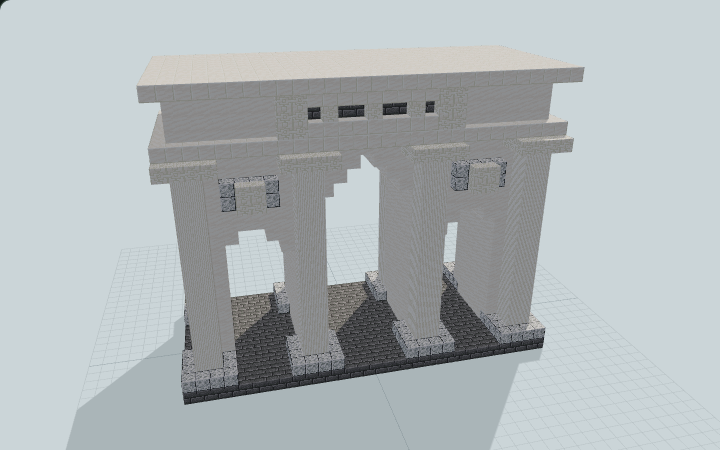 Loading 3D preview…
Minecraft Java Edition · Sponge .schem
Verification details
No revision-bound verification record is currently published for this build.
A 3D preview shows appearance, not game behavior. Bedrock conversion and Litematica compatibility are not verified unless separately recorded.
Quick Start
Place a freestanding ceremonial monument across a pedestrian procession road.
- 1
Place at road level
Set the stone-brick paving flush with the surrounding road. The north and south faces both admit players.
- 2
Walk the three portals
Use the taller central portal for the main procession, or either lower side passage for a separate pedestrian route.
The attic and cornice are decorative solid masonry; no upper rooms or defensive access are advertised.
Build Facts
JSON fact sheet- Dimensions
- 29 x 23 x 13 blocks
- Compiled blocks
- 4,403
- Category
- other
- Updated
Curated by MinePilot from a CraftDAG component plan. Canonical page: https://www.myminepilot.com/builds/roman-triple-bay-triumphal-arch
Materials
4,403 blocksPlaced block counts · stack equivalents, not crafting ingredients. Expand for exact BlockStates.
 Smooth Quartz2,462Placed blocks
minecraft:smooth_quartz× 2,462 Quartz Block73211×64 + 28
minecraft:quartz_block× 732 Quartz Pillar480Placed blocks
minecraft:quartz_pillar[axis=y]× 480 Stone Bricks3956×64 + 11
minecraft:stone_bricks× 395Chiseled Quartz Block1742×64 + 46
minecraft:chiseled_quartz_block× 174Polished Diorite160Placed blocks
minecraft:polished_diorite× 160Layer Guide
23 layersShowing the first 12 layers. Open the playground for the full interactive layer slider.
Import Guide
Java Edition- Download the protected
.schemfile for Roman Triple-Bay Triumphal Arch. - Place it in your WorldEdit or Litematica schematics folder.
- Load the schematic in-game, preview placement, then paste or build layer by layer.
Finding related builds…


