
Crystal Choir Amphitheater
Four half-moon bench tiers face a narrow raised stage beneath a supported folded crystal crown. An open-air venue for server storytelling and performances.
WorldEdit .schem available. No native .litematic file for this build.
3D Preview
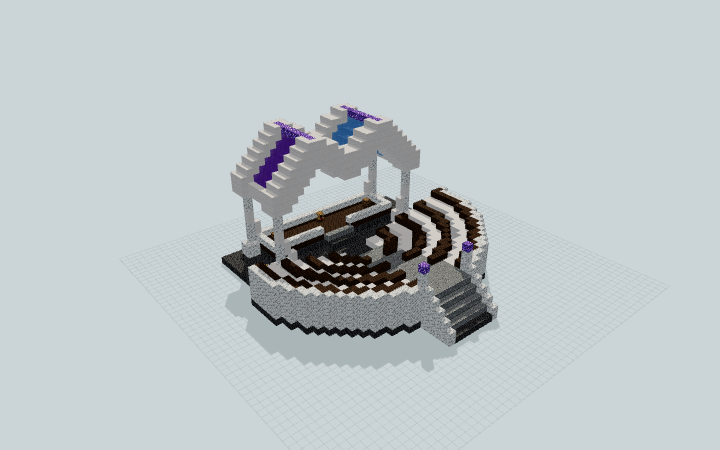 Loading 3D preview…
Minecraft Java Edition · Sponge .schem
Verification details
No revision-bound verification record is currently published for this build.
A 3D preview shows appearance, not game behavior. Bedrock conversion and Litematica compatibility are not verified unless separately recorded.
Setup / behavior: Static architecture and decorative crystal glazing. Native import and Minecraft game-version compatibility are unverified; no audible music or powered behavior is claimed.
Place and use the amphitheater
Reserve a level 39 × 35 site and 20 blocks of vertical clearance. Keep the north stair approach open; the audience tiers remain uncovered.
- 1
Orient the entrance
Face the seven-block-wide stair approach north. The artifact includes its foundation, tier bearings, and stage supports; no hill or terrain excavation is required.
- 2
Reach the seating and stage
Climb the north entry, descend the central aisle to any bench tier, then continue to the two stage steps. The rear stage has space beside a lectern and two prop barrels.
The crystal canopy is static decoration. The downloadable format is Sponge .schem; no native import or specific Minecraft version has been tested.
Build Facts
JSON fact sheet- Dimensions
- 39 x 20 x 35 blocks
- Compiled blocks
- 4,164
- Category
- other
- Updated
Curated by MinePilot from a CraftDAG component plan. Canonical page: https://www.myminepilot.com/builds/a08-crystal-choir-amphitheater
Materials
4,164 blocksPlaced block counts · stack equivalents, not crafting ingredients. Expand for exact BlockStates.
 Smooth Quartz1,634Placed blocks
minecraft:smooth_quartz× 1,634 Polished Deepslate1,330Placed blocks
minecraft:polished_deepslate× 1,330Calcite4306×64 + 46
minecraft:calcite× 430 Dark Oak Planks2784×64 + 22
minecraft:dark_oak_planks× 278 Purple Stained Glass1682×64 + 40
minecraft:purple_stained_glass× 168Light Blue Stained Glass1542×64 + 26
minecraft:light_blue_stained_glass× 154 Polished Andesite145Placed blocks
minecraft:polished_andesite× 145 Amethyst Block2020 / 64 stack
minecraft:amethyst_block× 20 Barrel22 / 64 stack
minecraft:barrel[facing=up,open=false]× 2 Lantern22 / 64 stack
minecraft:lantern[hanging=false]× 2Lectern1Placed blocks
minecraft:lectern[facing=north]× 1Layer Guide
20 layersShowing the first 12 layers. Open the playground for the full interactive layer slider.
Import Guide
Java Edition- Download the protected
.schemfile for Crystal Choir Amphitheater. - Place it in your WorldEdit or Litematica schematics folder.
- Load the schematic in-game, preview placement, then paste or build layer by layer.
Finding related builds…


