
Ember-Lotus Lantern Shrine
Eight raised copper and red petals frame a glowing amber lantern. Pale braces shelter a dark stone floor with four benches for a quiet fantasy meditation spot.
WorldEdit .schem available. No native .litematic file for this build.
3D Preview
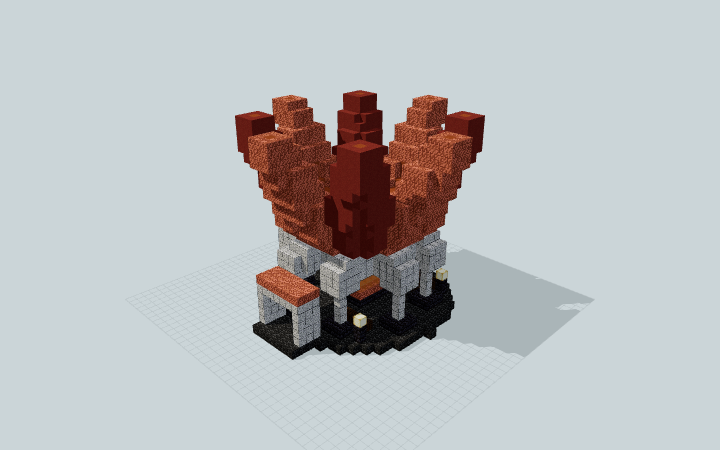 Loading 3D preview…
Minecraft Java Edition · Sponge .schem
Verification details
No revision-bound verification record is currently published for this build.
A 3D preview shows appearance, not game behavior. Bedrock conversion and Litematica compatibility are not verified unless separately recorded.
Setup / behavior: Static architectural decoration. No native Minecraft import or version-specific behavior has been verified.
Place the Lantern Shrine
An open meditation shelter centered on a static illuminated sculpture.
- 1
Prepare the site
Reserve a level 27 by 27 block footprint and 23 blocks of vertical space. Place the bottom floor against solid ground.
- 2
Use the south approach
The entrance projects toward positive Z. Follow its stone floor into the space around the lantern and use the four benches along the sides.
Sponge .schem for Java Edition. Native game import and specific Minecraft versions are unverified. The centerpiece is decorative and does not teleport players.
Build Facts
JSON fact sheet- Dimensions
- 27 x 23 x 27 blocks
- Compiled blocks
- 3,430
- Category
- other
- Updated
Curated by MinePilot from a CraftDAG component plan. Canonical page: https://www.myminepilot.com/builds/a08-ember-lotus-lantern-shrine
Materials
3,430 blocksPlaced block counts · stack equivalents, not crafting ingredients. Expand for exact BlockStates.
Waxed Cut Copper1,105Placed blocks
minecraft:waxed_cut_copper× 1,105 Red Terracotta1,00015×64 + 40
minecraft:red_terracotta× 1,000Polished Diorite513Placed blocks
minecraft:polished_diorite× 513 Deepslate Tiles397Placed blocks
minecraft:deepslate_tiles× 397Orange Terracotta1432×64 + 15
minecraft:orange_terracotta× 143 Polished Blackstone Bricks1031×64 + 39
minecraft:polished_blackstone_bricks× 103Orange Stained Glass801×64 + 16
minecraft:orange_stained_glass× 80Ochre Froglight59Placed blocks
minecraft:ochre_froglight× 59 Dark Oak Planks3030 / 64 stack
minecraft:dark_oak_planks× 30Layer Guide
23 layersShowing the first 12 layers. Open the playground for the full interactive layer slider.
Import Guide
Java Edition- Download the protected
.schemfile for Ember-Lotus Lantern Shrine. - Place it in your WorldEdit or Litematica schematics folder.
- Load the schematic in-game, preview placement, then paste or build layer by layer.
Finding related builds…


