
Root-Crown Druid Sanctuary
A branching oak rises through a low open ring with three covered timber galleries. The north approach leads to seating and lore tables for woodland roleplay.
WorldEdit .schem available. No native .litematic file for this build.
3D Preview
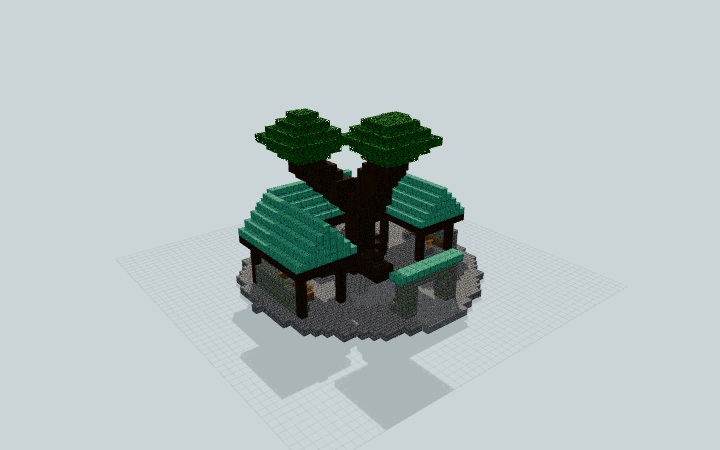 Loading 3D preview…
Minecraft Java Edition · Sponge .schem
Verification details
No revision-bound verification record is currently published for this build.
A 3D preview shows appearance, not game behavior. Bedrock conversion and Litematica compatibility are not verified unless separately recorded.
Setup / behavior: Static sanctuary architecture. Native Minecraft import, movement and Minecraft/WorldEdit version compatibility are unverified.
Gather beneath the root crown
A single ground-level sanctuary combines a central branching tree with three low roofed galleries.
- 1
Prepare the plot
Reserve a level 35 × 35-block area with 24 blocks of vertical clearance. Support the circular foundation and its gallery footings on solid ground.
- 2
Use the north approach
Enter beneath the north stone arch, then follow the open stone ring around the central roots. The west seating shelter, east study table and south council benches all sit at ground level.
- 3
Keep the open crown
Leave the spaces between the three leaf crowns open so daylight reaches the central gathering ring. The tree, lore tables and lights are static furnishings.
Local schematic export and block-state round trip are checked separately. Native Minecraft import, movement and version compatibility have not been tested.
Build Facts
JSON fact sheet- Dimensions
- 35 x 24 x 35 blocks
- Compiled blocks
- 3,820
- Category
- other
- Updated
Curated by MinePilot from a CraftDAG component plan. Canonical page: https://www.myminepilot.com/builds/a08-root-crown-druid-sanctuary
Materials
3,820 blocksPlaced block counts · stack equivalents, not crafting ingredients. Expand for exact BlockStates.
Oxidized Copper1,022Placed blocks
minecraft:oxidized_copper× 1,022 Stone Bricks73711×64 + 33
minecraft:stone_bricks× 737 Oak Leaves70511×64 + 1
minecraft:oak_leaves[distance=1,persistent=true]× 705 Dark Oak Log68010×64 + 40
minecraft:dark_oak_log× 680 Dark Oak Planks3605×64 + 40
minecraft:dark_oak_planks× 360 Mossy Stone Bricks1372×64 + 9
minecraft:mossy_stone_bricks× 137 Polished Andesite128Placed blocks
minecraft:polished_andesite× 128 Spruce Stairs2222 / 64 stack
minecraft:spruce_stairs[facing=north,half=bottom,shape=straight]× 15minecraft:spruce_stairs[facing=east,half=bottom,shape=straight]× 7Chiseled Stone Bricks1111 / 64 stack
minecraft:chiseled_stone_bricks× 11 Spruce Planks88 / 64 stack
minecraft:spruce_planks× 8 Lantern66 / 64 stack
minecraft:lantern[hanging=false]× 6Lectern3Placed blocks
minecraft:lectern[facing=north]× 1minecraft:lectern[facing=south]× 1minecraft:lectern[facing=west]× 1Flower Pot1Placed blocks
minecraft:flower_pot× 1Layer Guide
24 layersShowing the first 12 layers. Open the playground for the full interactive layer slider.
Import Guide
Java Edition- Download the protected
.schemfile for Root-Crown Druid Sanctuary. - Place it in your WorldEdit or Litematica schematics folder.
- Load the schematic in-game, preview placement, then paste or build layer by layer.
Finding related builds…


