
Dragon-Scale Lore Reliquary
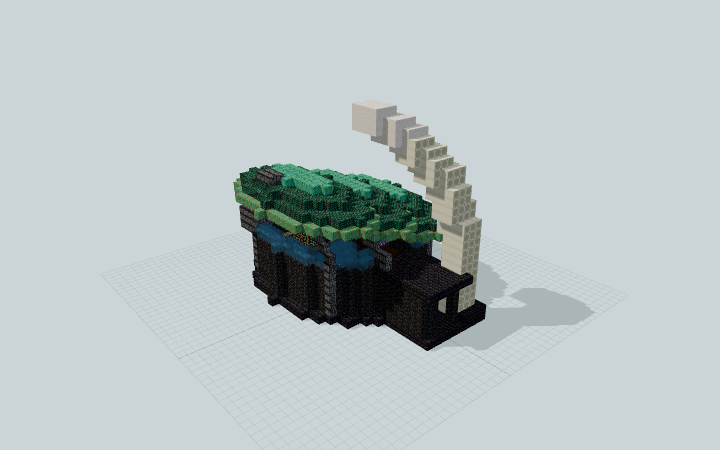
An oval lore museum with three overlapping scale roofs, basalt ribs, an ivory entry horn and a furnished visitor loop designed for fantasy exhibits.
WorldEdit .schem available. No native .litematic file for this build.
3D Preview
 Loading 3D preview…
Minecraft Java Edition · Sponge .schem
Verification details
No revision-bound verification record is currently published for this build.
A 3D preview shows appearance, not game behavior. Bedrock conversion and Litematica compatibility are not verified unless separately recorded.
Setup / behavior: Static decorative architecture. Native Minecraft import and Minecraft/WorldEdit version compatibility have not been verified.
Place the reliquary
A museum gallery with an east vestibule and a visitor loop around a sealed glass display.
- 1
Leave room for the horn
Reserve a level 33 × 29-block footprint and 25 blocks of height. Keep the east approach clear; the curved horn rises beside the entrance.
- 2
Browse the gallery
Enter through the east opening beside reception. Follow the aisle around the central case to reach manuscript shelves and the north and south display tables.
Java Edition Sponge .schem; export and schematic round-trip checks passed. Native Minecraft import and Minecraft/WorldEdit version compatibility are not verified. The horn and displayed relic are decorative.
Build Facts
JSON fact sheet- Dimensions
- 33 x 25 x 29 blocks
- Compiled blocks
- 3,096
- Category
- other
- Updated
Curated by MinePilot from a CraftDAG component plan. Canonical page: https://www.myminepilot.com/builds/a08-dragon-scale-lore-reliquary
Materials
3,096 blocksPlaced block counts · stack equivalents, not crafting ingredients. Expand for exact BlockStates.
 Dark Prismarine794Placed blocks
minecraft:dark_prismarine× 794 Polished Blackstone Bricks6069×64 + 30
minecraft:polished_blackstone_bricks× 606Weathered Copper585Placed blocks
minecraft:weathered_copper× 585 Deepslate Tiles427Placed blocks
minecraft:deepslate_tiles× 427Bone Block2183×64 + 26
minecraft:bone_block× 218Polished Basalt115Placed blocks
minecraft:polished_basalt× 115Cyan Stained Glass1061×64 + 42
minecraft:cyan_stained_glass× 106Oxidized Copper93Placed blocks
minecraft:oxidized_copper× 93 Quartz Block831×64 + 19
minecraft:quartz_block× 83 Dark Oak Planks3838 / 64 stack
minecraft:dark_oak_planks× 38 Bookshelf2424 / 64 stack
minecraft:bookshelf× 24Glowstone5Placed blocks
minecraft:glowstone× 5 Amethyst Block22 / 64 stack
minecraft:amethyst_block× 2Layer Guide
25 layersShowing the first 12 layers. Open the playground for the full interactive layer slider.
Import Guide
Java Edition- Download the protected
.schemfile for Dragon-Scale Lore Reliquary. - Place it in your WorldEdit or Litematica schematics folder.
- Load the schematic in-game, preview placement, then paste or build layer by layer.
Finding related builds…


