
Faerie Bellflower Council Hall
A downturned violet flower bell shelters a raised circular meeting floor. A south stepped ramp leads to continuous curved seating for a fantasy faction hall.
WorldEdit .schem available. No native .litematic file for this build.
3D Preview
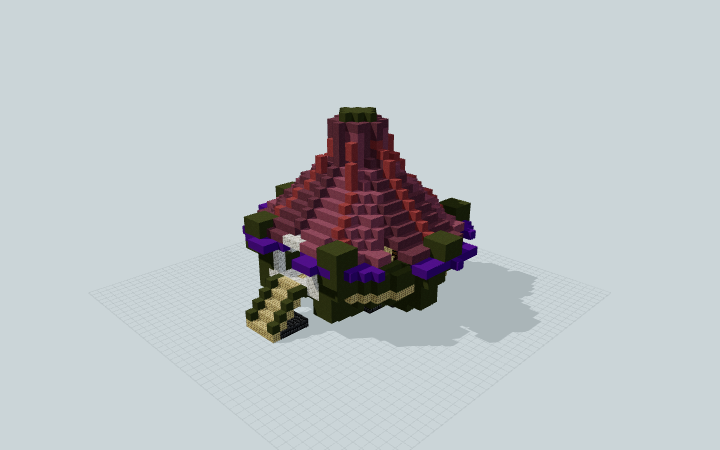 Loading 3D preview…
Minecraft Java Edition · Sponge .schem
Verification details
No revision-bound verification record is currently published for this build.
A 3D preview shows appearance, not game behavior. Bedrock conversion and Litematica compatibility are not verified unless separately recorded.
Setup / behavior: Static floral architecture and furniture. Native Minecraft import, movement and game-version compatibility are unverified; no magical or automated behavior is claimed.
Place the bellflower hall
Reserve a level 31 × 29 plot with 23 blocks of height. Keep the south approach open; the short stalk and spreading floor bearings are included.
- 1
Face the south approach
Orient the five-block-wide stepped ramp toward your path. Its central three blocks provide the route up to the raised gathering floor.
- 2
Meet beneath the bell
Pass through the broad south frame to the shared center. The curved bench wraps around the sides and north, with a lectern and a supply barrel beside the standing area.
The roof is static decoration. The downloadable format is Sponge .schem; native import and a specific Minecraft version have not been tested.
Build Facts
JSON fact sheet- Dimensions
- 31 x 23 x 29 blocks
- Compiled blocks
- 2,831
- Category
- other
- Updated
Curated by MinePilot from a CraftDAG component plan. Canonical page: https://www.myminepilot.com/builds/a08-faerie-bellflower-council-hall
Materials
2,831 blocksPlaced block counts · stack equivalents, not crafting ingredients. Expand for exact BlockStates.
Green Terracotta1,31620×64 + 36
minecraft:green_terracotta× 1,316 Purple Terracotta4376×64 + 53
minecraft:purple_terracotta× 437Magenta Terracotta3805×64 + 60
minecraft:magenta_terracotta× 380 Birch Planks2574×64 + 1
minecraft:birch_planks× 257Purple Concrete1482×64 + 20
minecraft:purple_concrete× 148Calcite851×64 + 21
minecraft:calcite× 85Pink Terracotta741×64 + 10
minecraft:pink_terracotta× 74 Dark Oak Planks711×64 + 7
minecraft:dark_oak_planks× 71 Deepslate Bricks5757 / 64 stack
minecraft:deepslate_bricks× 57 Lantern44 / 64 stack
minecraft:lantern[hanging=false,waterlogged=false]× 4 Barrel11 / 64 stack
minecraft:barrel[facing=up,open=false]× 1Lectern1Placed blocks
minecraft:lectern[facing=south,has_book=false,powered=false]× 1Layer Guide
23 layersShowing the first 12 layers. Open the playground for the full interactive layer slider.
Import Guide
Java Edition- Download the protected
.schemfile for Faerie Bellflower Council Hall. - Place it in your WorldEdit or Litematica schematics folder.
- Load the schematic in-game, preview placement, then paste or build layer by layer.
Finding related builds…


