
Mirelight Mushroom Oracle Hall
One furnished oracle hall beneath three uneven mushroom caps, with branching stems, audience benches and a consultation desk designed for forest storytelling.
WorldEdit .schem available. No native .litematic file for this build.
3D Preview
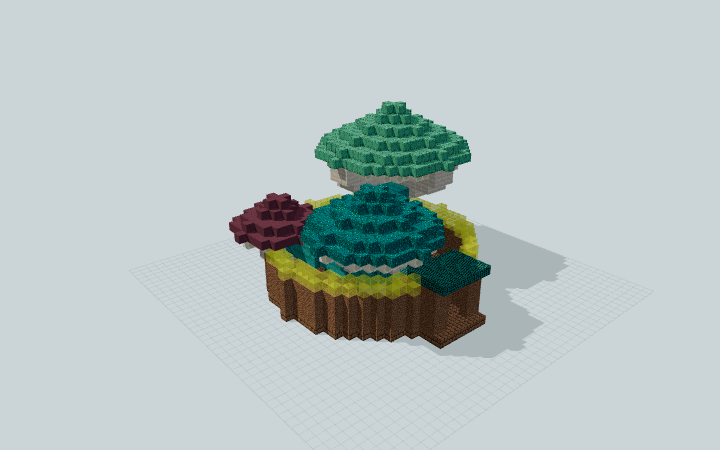 Loading 3D preview…
Minecraft Java Edition · Sponge .schem
Verification details
No revision-bound verification record is currently published for this build.
A 3D preview shows appearance, not game behavior. Bedrock conversion and Litematica compatibility are not verified unless separately recorded.
Setup / behavior: Static decorative architecture. Native Minecraft import and Minecraft/WorldEdit version compatibility have not been verified.
Use the gathering hall
Three unequal caps shelter one furnished storytelling floor, rather than separate mushroom houses.
- 1
Prepare the east approach
Allow a level 29 × 31-block plot with 20 blocks of height. Leave the east side open for the short covered vestibule.
- 2
Arrange a gathering
The aisle beside the audience benches reaches the oracle table. A separate consultation desk sits beneath the low purple cap; bookshelves line the shared hall.
Java Edition Sponge .schem; export and schematic round-trip checks passed. Native Minecraft import and Minecraft/WorldEdit version compatibility are not verified. The table and crystal are static roleplay furnishings.
Build Facts
JSON fact sheet- Dimensions
- 29 x 20 x 31 blocks
- Compiled blocks
- 2,990
- Category
- other
- Updated
Curated by MinePilot from a CraftDAG component plan. Canonical page: https://www.myminepilot.com/builds/a08-mirelight-mushroom-oracle
Materials
2,990 blocksPlaced block counts · stack equivalents, not crafting ingredients. Expand for exact BlockStates.
Oxidized Copper630Placed blocks
minecraft:oxidized_copper× 630Mud Bricks4386×64 + 54
minecraft:mud_bricks× 438Mushroom Stem387Placed blocks
minecraft:mushroom_stem× 387Warped Wart Block3295×64 + 9
minecraft:warped_wart_block× 329Stripped Warped Stem311Placed blocks
minecraft:stripped_warped_stem× 311Packed Mud286Placed blocks
minecraft:packed_mud× 286Bone Block2564×64
minecraft:bone_block× 256 Purple Terracotta1482×64 + 20
minecraft:purple_terracotta× 148Yellow Stained Glass1061×64 + 42
minecraft:yellow_stained_glass× 106Warped Planks761×64 + 12
minecraft:warped_planks× 76 Bookshelf1919 / 64 stack
minecraft:bookshelf× 19Glowstone3Placed blocks
minecraft:glowstone× 3 Amethyst Block11 / 64 stack
minecraft:amethyst_block× 1Layer Guide
20 layersShowing the first 12 layers. Open the playground for the full interactive layer slider.
Import Guide
Java Edition- Download the protected
.schemfile for Mirelight Mushroom Oracle Hall. - Place it in your WorldEdit or Litematica schematics folder.
- Load the schematic in-game, preview placement, then paste or build layer by layer.
Finding related builds…


