
Fallen-Star Archive
An angular roof rift exposes a lower archive and purple meteorite display. Use the shelf wings for a server lore collection.
WorldEdit .schem available. No native .litematic file for this build.
3D Preview
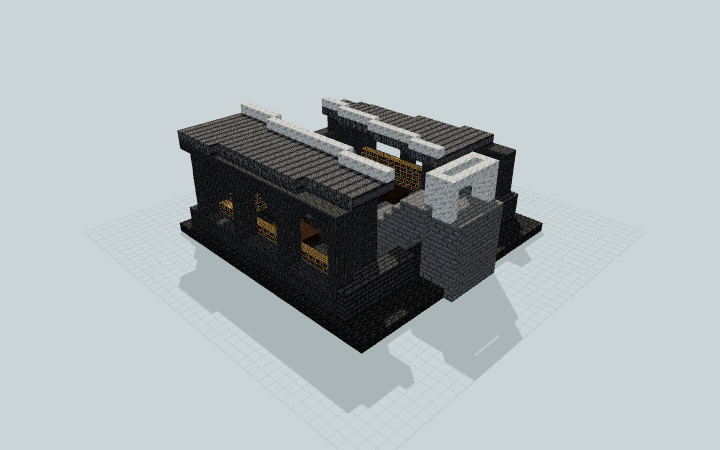 Loading 3D preview…
Minecraft Java Edition · Sponge .schem
Verification details
No revision-bound verification record is currently published for this build.
A 3D preview shows appearance, not game behavior. Bedrock conversion and Litematica compatibility are not verified unless separately recorded.
Setup / behavior: Static archive architecture with a decorative meteorite. Native Minecraft import and player traversal are untested.
Exploring the Fallen-Star Archive
A raised north arrival descends into two shelf wings and a central display beneath the open roof rift.
- 1
Keep the shell complete
Reserve a 31 × 31 block footprint and 16 blocks of height. Keep the included floor, retaining courses and stair supports; the lower archive does not require a generated crater.
- 2
Descend from the north
Enter through the pale frame at the raised north arrival, then follow the supported stair down to the lower lobby.
- 3
Browse the archive
Use the west and east aisles beside the reading tables to reach the bookshelf wings. The roof wedge leaves the central gallery open to the sky.
- 4
Circle the display
The visitor aisle runs around the raised meteorite dais to the back book wall. The purple centerpiece is a static block sculpture.
Native Minecraft import, game-version compatibility and player movement have not been tested.
Build Facts
JSON fact sheet- Dimensions
- 31 x 16 x 31 blocks
- Compiled blocks
- 2,947
- Category
- other
- Updated
Curated by MinePilot from a CraftDAG component plan. Canonical page: https://www.myminepilot.com/builds/a08-fallen-star-archive
Materials
2,947 blocksPlaced block counts · stack equivalents, not crafting ingredients. Expand for exact BlockStates.
 Polished Deepslate847Placed blocks
minecraft:polished_deepslate× 847 Deepslate Tiles802Placed blocks
minecraft:deepslate_tiles× 802 Stone Bricks5047×64 + 56
minecraft:stone_bricks× 504Polished Basalt314Placed blocks
minecraft:polished_basalt× 314 Bookshelf1652×64 + 37
minecraft:bookshelf× 165 Deepslate Bricks961×64 + 32
minecraft:deepslate_bricks× 96Calcite771×64 + 13
minecraft:calcite× 77Chiseled Stone Bricks4949 / 64 stack
minecraft:chiseled_stone_bricks× 49 Crying Obsidian45Placed blocks
minecraft:crying_obsidian× 45 Dark Oak Planks3030 / 64 stack
minecraft:dark_oak_planks× 30 Stone Brick Wall1616 / 64 stack
minecraft:stone_brick_wall× 16 Sea Lantern2Placed blocks
minecraft:sea_lantern× 2Layer Guide
13 layersShowing the first 12 layers. Open the playground for the full interactive layer slider.
Import Guide
Java Edition- Download the protected
.schemfile for Fallen-Star Archive. - Place it in your WorldEdit or Litematica schematics folder.
- Load the schematic in-game, preview placement, then paste or build layer by layer.
Finding related builds…


