
Nightbloom Dream Chamber
A closed four-petal pod rests in a dark root cradle beneath a blue-glass oculus. A north descent leads to lounge niches and a chart table for a quiet fantasy reading room.
WorldEdit .schem available. No native .litematic file for this build.
3D Preview
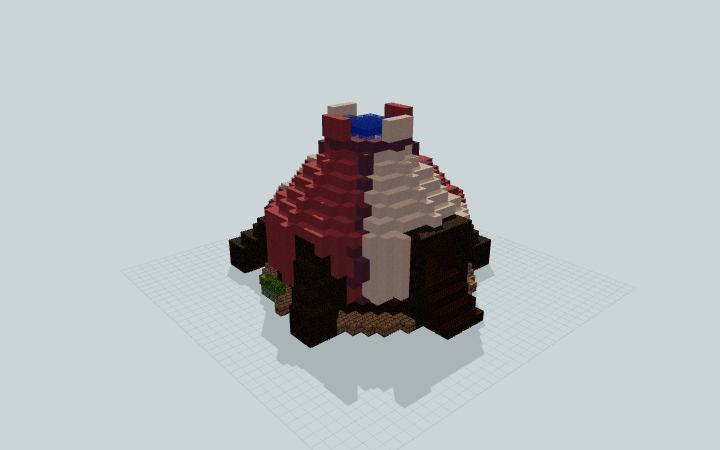 Loading 3D preview…
Minecraft Java Edition · Sponge .schem
Verification details
No revision-bound verification record is currently published for this build.
A 3D preview shows appearance, not game behavior. Bedrock conversion and Litematica compatibility are not verified unless separately recorded.
Setup / behavior: Static reading chamber. Native Minecraft import, gameplay and version compatibility have not been verified.
Place the Nightbloom chamber
Reserve a 27×18×27 space for this freestanding reading pod, its root braces and north stair.
- 1
Keep the plot clear
Place the lowest built footings on a level prepared surface. Keep the north approach and the blue-glass crown free of surrounding blocks.
- 2
Follow the north entrance
Climb the short approach to the north opening, then descend the inner stair to the reading floor. The two lounge niches sit on opposite sides; the chart table is toward the back.
Java-targeted Sponge .schem only. Native import, Minecraft version and player movement are unverified. Lanterns and the chart table are static furnishings; no magical effect is implemented.
Build Facts
JSON fact sheet- Dimensions
- 27 x 18 x 27 blocks
- Compiled blocks
- 2,355
- Category
- other
- Updated
Curated by MinePilot from a CraftDAG component plan. Canonical page: https://www.myminepilot.com/builds/a08-nightbloom-dream-chamber
Materials
2,355 blocksPlaced block counts · stack equivalents, not crafting ingredients. Expand for exact BlockStates.
Pink Terracotta4817×64 + 33
minecraft:pink_terracotta× 481Dark Oak Wood4587×64 + 10
minecraft:dark_oak_wood× 458 Dark Oak Planks4386×64 + 54
minecraft:dark_oak_planks× 438 White Terracotta4376×64 + 53
minecraft:white_terracotta× 437Mud Bricks3665×64 + 46
minecraft:mud_bricks× 366 Purple Terracotta751×64 + 11
minecraft:purple_terracotta× 75Blue Stained Glass2929 / 64 stack
minecraft:blue_stained_glass× 29 Purple Wool1616 / 64 stack
minecraft:purple_wool× 16Purple Carpet1515 / 64 stack
minecraft:purple_carpet× 15 Bookshelf1414 / 64 stack
minecraft:bookshelf× 14Cartography Table6Placed blocks
minecraft:cartography_table× 6 Moss Block66 / 64 stack
minecraft:moss_block× 6 Mossy Stone Bricks66 / 64 stack
minecraft:mossy_stone_bricks× 6Dark Oak Fence44 / 64 stack
minecraft:dark_oak_fence× 4 Lantern44 / 64 stack
minecraft:lantern[hanging=false]× 4Layer Guide
18 layersShowing the first 12 layers. Open the playground for the full interactive layer slider.
Import Guide
Java Edition- Download the protected
.schemfile for Nightbloom Dream Chamber. - Place it in your WorldEdit or Litematica schematics folder.
- Load the schematic in-game, preview placement, then paste or build layer by layer.
Finding related builds…


