
Sun–Moon Twin Pavilion
A curling moon roof faces a twelve-ray sun canopy across a glazed exhibition room. Two furnished halls share one south entrance for a fantasy gathering.
WorldEdit .schem available. No native .litematic file for this build.
3D Preview
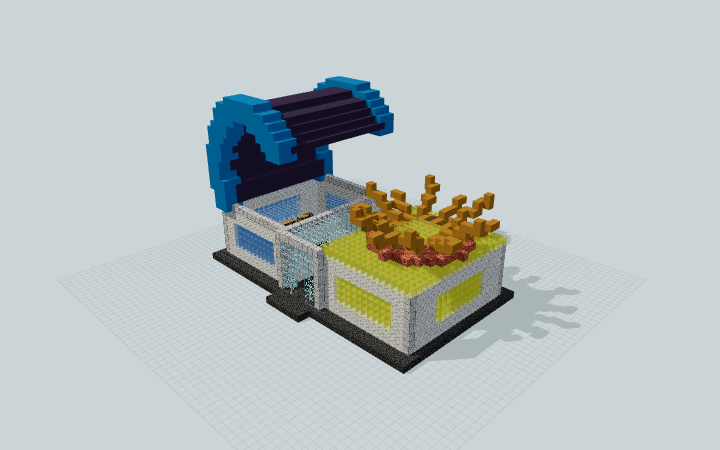 Loading 3D preview…
Minecraft Java Edition · Sponge .schem
Verification details
No revision-bound verification record is currently published for this build.
A 3D preview shows appearance, not game behavior. Bedrock conversion and Litematica compatibility are not verified unless separately recorded.
Visit both observance halls
Place the connected pavilion on a flat supported site, with the central glazed entrance facing south. The two halls and their displays are static roleplay spaces.
- 1
Reserve the footprint
Reserve the 43 by 31 block plan envelope and 27 blocks of vertical clearance. Seat the dark shared podium on your prepared ground; keep its central south approach clear.
- 2
Enter the glazed room
Approach from the south along the short central podium extension. The opening leads into the glazed exhibition room; turn west for the moon hall or east for the sun hall.
- 3
Use the gathering spaces
Both halls have two bench rows and a small display plinth. Keep the cross-building aisle clear when adding your own exhibits. The roofs are decorative and have no advertised access route.
Preview and schematic checks do not establish in-game import or version compatibility. The sun rays, moon roof and displays do not move or perform astronomy.
Build Facts
JSON fact sheet- Dimensions
- 43 x 27 x 31 blocks
- Compiled blocks
- 4,424
- Category
- large build
- Updated
Curated by MinePilot from a CraftDAG component plan. Canonical page: https://www.myminepilot.com/builds/a08-sun-moon-twin-pavilion
Materials
4,424 blocksPlaced block counts · stack equivalents, not crafting ingredients. Expand for exact BlockStates.
Blue Terracotta81012×64 + 42
minecraft:blue_terracotta× 810Calcite74411×64 + 40
minecraft:calcite× 744Light Blue Concrete5528×64 + 40
minecraft:light_blue_concrete× 552Yellow Stained Glass4657×64 + 17
minecraft:yellow_stained_glass× 465 Polished Deepslate358Placed blocks
minecraft:polished_deepslate× 358 Cut Sandstone320Placed blocks
minecraft:cut_sandstone× 320 Deepslate Tiles320Placed blocks
minecraft:deepslate_tiles× 320Polished Diorite185Placed blocks
minecraft:polished_diorite× 185 Glass1842×64 + 56
minecraft:glass× 184Waxed Cut Copper149Placed blocks
minecraft:waxed_cut_copper× 149Yellow Terracotta1372×64 + 9
minecraft:yellow_terracotta× 137Light Blue Stained Glass1201×64 + 56
minecraft:light_blue_stained_glass× 120 Bookshelf4242 / 64 stack
minecraft:bookshelf× 42 Spruce Planks3232 / 64 stack
minecraft:spruce_planks× 32 Sea Lantern6Placed blocks
minecraft:sea_lantern× 6Layer Guide
27 layersShowing the first 12 layers. Open the playground for the full interactive layer slider.
Import Guide
Java Edition- Download the protected
.schemfile for Sun–Moon Twin Pavilion. - Place it in your WorldEdit or Litematica schematics folder.
- Load the schematic in-game, preview placement, then paste or build layer by layer.
Finding related builds…


