
Greek L-Shaped Agora Stoa
An L-shaped Greek stoa with two roofed colonnades, a continuous shaded promenade and reachable rear alcoves. Built for agora gatherings and town roleplay.
WorldEdit .schem available. No native .litematic file for this build.
3D Preview
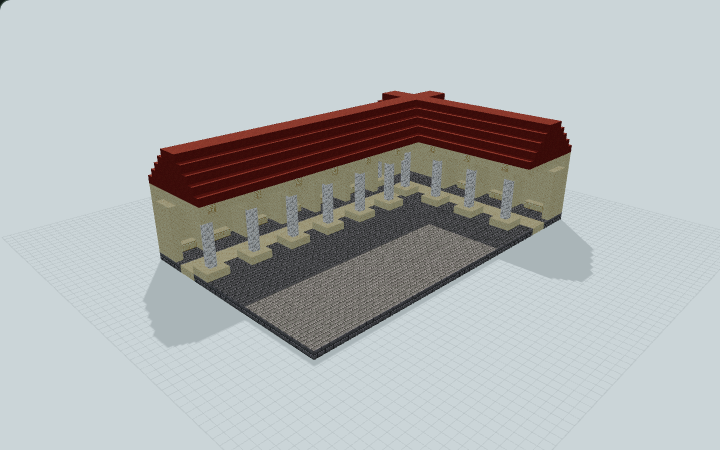 Loading 3D preview…
Minecraft Java Edition · Sponge .schem
Verification details
No revision-bound verification record is currently published for this build.
A 3D preview shows appearance, not game behavior. Bedrock conversion and Litematica compatibility are not verified unless separately recorded.
Quick Start
Use the open agora and single-level covered L-shaped promenade for civic gatherings, NPC placement and town roleplay.
- 1
Enter the promenade
Approach from the north between the west wing columns, or cross the open agora toward the long south colonnade. The stone foundation is one level throughout.
- 2
Follow the L-shaped route
Walk behind the columns through the west wing and around the covered southwest corner into the long south wing. Keep the broad central corridor clear.
- 3
Use the alcoves
Step from the promenade into the open rear alcoves. Benches provide seating; NPCs, trades and event mechanics must be supplied by the player.
Build Facts
JSON fact sheet- Dimensions
- 47 x 15 x 29 blocks
- Compiled blocks
- 5,569
- Category
- large build
- Updated
Curated by MinePilot from a CraftDAG component plan. Canonical page: https://www.myminepilot.com/builds/greek-l-shaped-stoa
Materials
5,569 blocksPlaced block counts · stack equivalents, not crafting ingredients. Expand for exact BlockStates.
 Red Terracotta2,37537×64 + 7
minecraft:red_terracotta× 2,375 Smooth Sandstone1,919Placed blocks
minecraft:smooth_sandstone× 1,919 Stone Bricks1,17118×64 + 19
minecraft:stone_bricks× 1,171Calcite661×64 + 2
minecraft:calcite× 66 Cut Sandstone27Placed blocks
minecraft:cut_sandstone× 27Chiseled Sandstone11Placed blocks
minecraft:chiseled_sandstone× 11Layer Guide
15 layersShowing the first 12 layers. Open the playground for the full interactive layer slider.
Import Guide
Java Edition- Download the protected
.schemfile for Greek L-Shaped Agora Stoa. - Place it in your WorldEdit or Litematica schematics folder.
- Load the schematic in-game, preview placement, then paste or build layer by layer.
Finding related builds…


