
Andalusian Horseshoe-Arch Cloister
An Andalusian cloister with four stepped horseshoe arcades, orange trees and a reflecting rill beneath terracotta roofs. Built for peaceful historical courtyards.
WorldEdit .schem available. No native .litematic file for this build.
3D Preview
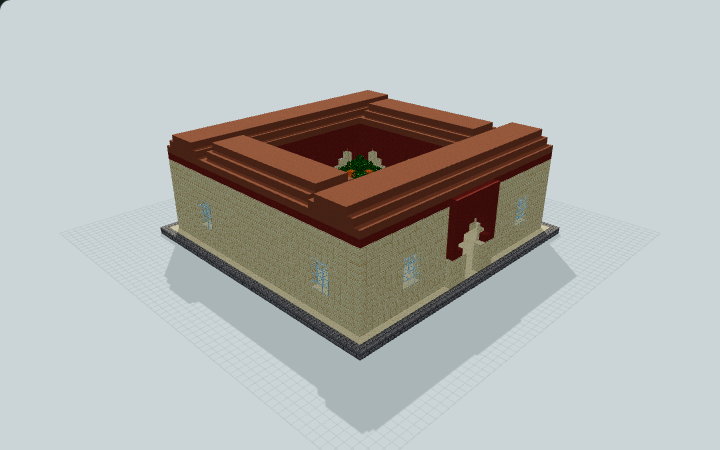 Loading 3D preview…
Minecraft Java Edition · Sponge .schem
Verification details
No revision-bound verification record is currently published for this build.
A 3D preview shows appearance, not game behavior. Bedrock conversion and Litematica compatibility are not verified unless separately recorded.
Quick Start
Two opposing gate approaches lead into an open courtyard enclosed by four low sheltered wings and stepped horseshoe arcades.
- 1
Enter from either gate
Use the centered north or south gate. The central arcade opens onto the courtyard beside the reflecting rill.
- 2
Walk the complete cloister
Follow the covered sandstone walkway behind the inner arches. The north, east, south and west wings meet at all four corners.
- 3
Explore the garden
Follow the dry paths around the contained rill and four decorative orange trees.
An original block-scale interpretation of Andalusian courtyard architecture, with decorative planting and shallow water.
Build Facts
JSON fact sheet- Dimensions
- 43 x 17 x 43 blocks
- Compiled blocks
- 7,902
- Category
- large build
- Updated
Curated by MinePilot from a CraftDAG component plan. Canonical page: https://www.myminepilot.com/builds/andalusian-horseshoe-cloister
Materials
7,902 blocksPlaced block counts · stack equivalents, not crafting ingredients. Expand for exact BlockStates.
 Terracotta2,52039×64 + 24
minecraft:terracotta× 2,520 Cut Sandstone1,946Placed blocks
minecraft:cut_sandstone× 1,946 Smooth Sandstone1,580Placed blocks
minecraft:smooth_sandstone× 1,580 Red Terracotta1,23419×64 + 18
minecraft:red_terracotta× 1,234 Stone Bricks1682×64 + 40
minecraft:stone_bricks× 168 Oak Leaves1602×64 + 32
minecraft:oak_leaves[persistent=true]× 160 Glass961×64 + 32
minecraft:glass× 96 Grass Block681×64 + 4
minecraft:grass_block[snowy=false]× 68 Prismarine Bricks3333 / 64 stack
minecraft:prismarine_bricks× 33 Water33Placed blocks
minecraft:water× 33Calcite3232 / 64 stack
minecraft:calcite× 32 Oak Log1616 / 64 stack
minecraft:oak_log[axis=y]× 16 Orange Wool1616 / 64 stack
minecraft:orange_wool× 16Layer Guide
16 layersShowing the first 12 layers. Open the playground for the full interactive layer slider.
Import Guide
Java Edition- Download the protected
.schemfile for Andalusian Horseshoe-Arch Cloister. - Place it in your WorldEdit or Litematica schematics folder.
- Load the schematic in-game, preview placement, then paste or build layer by layer.
Finding related builds…


