
Brutalist Void Memorial
Unequal concrete walls frame open sky above a sunken reflection court, with broad steps and a dry loop. Built for quiet memorial gardens and creative spawns.
WorldEdit .schem available. No native .litematic file for this build.
3D Preview
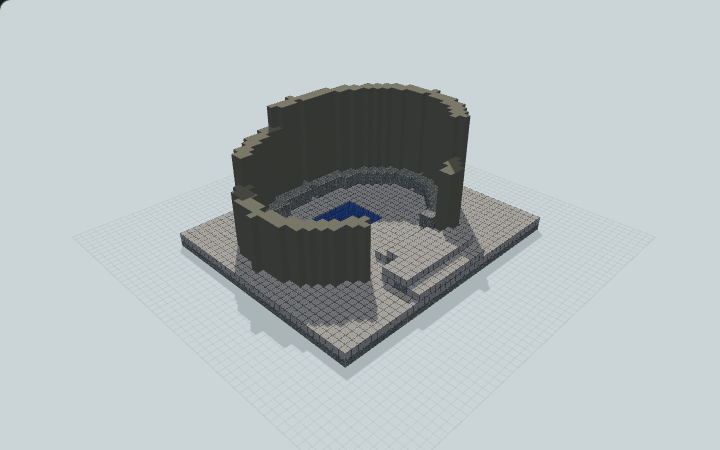 Loading 3D preview…
Minecraft Java Edition · Sponge .schem
Verification details
No revision-bound verification record is currently published for this build.
A 3D preview shows appearance, not game behavior. Bedrock conversion and Litematica compatibility are not verified unless separately recorded.
Walk the memorial
A static architectural memorial with a contained shallow basin and a dry route.
- 1
Place the foundation
Place the complete low foundation on a level prepared surface with the broad entrance steps facing your path.
- 2
Enter the court
Climb the broad approach steps, cross the landing and descend through the open wall breach to the lower court.
- 3
Follow the dry loop
Walk around the shallow basin on the dry floor and return by the same broad steps to exit.
The water is decorative. The wall tops are not an accessible lookout.
Build Facts
JSON fact sheet- Dimensions
- 39 x 17 x 33 blocks
- Compiled blocks
- 4,831
- Category
- large build
- Updated
Curated by MinePilot from a CraftDAG component plan. Canonical page: https://www.myminepilot.com/builds/brutalist-void-memorial
Materials
4,831 blocksPlaced block counts · stack equivalents, not crafting ingredients. Expand for exact BlockStates.
 Light Gray Concrete1,82728×64 + 35
minecraft:light_gray_concrete× 1,827 Polished Andesite1,581Placed blocks
minecraft:polished_andesite× 1,581 Smooth Stone1,367Placed blocks
minecraft:smooth_stone× 1,367 Water56Placed blocks
minecraft:water× 56Layer Guide
17 layersShowing the first 12 layers. Open the playground for the full interactive layer slider.
Import Guide
Java Edition- Download the protected
.schemfile for Brutalist Void Memorial. - Place it in your WorldEdit or Litematica schematics folder.
- Load the schematic in-game, preview placement, then paste or build layer by layer.
Finding related builds…


