
Quarry Stonecutting Supply Yard
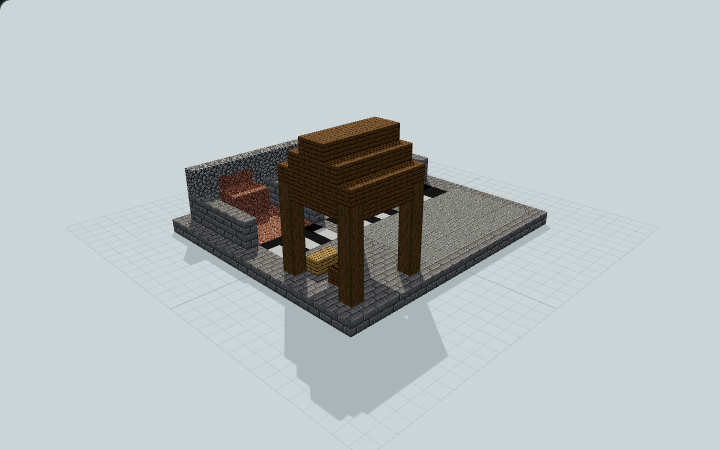
Three marked material bays and a sample wall frame an open loading apron, with a small covered stonecutter bench, built for manual quarry-supply work beside a survival base.
WorldEdit .schem available. No native .litematic file for this build.
3D Preview
 Loading 3D preview…
Minecraft Java Edition · Sponge .schem
Verification details
No revision-bound verification record is currently published for this build.
A 3D preview shows appearance, not game behavior. Bedrock conversion and Litematica compatibility are not verified unless separately recorded.
Manual quarry supply work
An open apron connects three material bays and a small roofed manual stonecutting station.
- 1
Read the three bay markers
White floor bars identify I: stone, II: andesite and III: granite. Match each number to its material floor and wall sample.
- 2
Stock and cut manually
Add your own tool supplies to the empty barrels. Reach the real stonecutter from the north or west under the small front-right roof and operate its normal interface manually.
- 3
Keep the apron open
Use the broad front-left apron and the clear strip before the three bays for loading. Sample piles are static building blocks, not item inventories or a processing machine.
No tools, stored item inventory, mine shaft, excavation, terrain, powered cutter or automatic processing are included. The I/II/III labels are physical contrasting floor bars, not sign text or NBT. Static access checks are not native Minecraft interaction validation.
Build Facts
JSON fact sheet- Dimensions
- 21 x 10 x 19 blocks
- Compiled blocks
- 694
- Category
- other
- Updated
Curated by MinePilot from a CraftDAG component plan. Canonical page: https://www.myminepilot.com/builds/quarry-stonecutter-yard
Materials
694 blocksPlaced block counts · stack equivalents, not crafting ingredients. Expand for exact BlockStates.
 Stone Bricks2363×64 + 44
minecraft:stone_bricks× 236 Spruce Planks1041×64 + 40
minecraft:spruce_planks× 104 Polished Andesite84Placed blocks
minecraft:polished_andesite× 84 Cobblestone5050 / 64 stack
minecraft:cobblestone× 50 Andesite48Placed blocks
minecraft:andesite× 48Granite48Placed blocks
minecraft:granite× 48 Stone4848 / 64 stack
minecraft:stone× 48 Black Concrete3333 / 64 stack
minecraft:black_concrete× 33Stripped Spruce Log2424 / 64 stack
minecraft:stripped_spruce_log[axis=y]× 24 White Concrete1212 / 64 stack
minecraft:white_concrete× 12 Barrel22 / 64 stack
minecraft:barrel[facing=east,open=false]× 1minecraft:barrel[facing=west,open=false]× 1 Oak Planks22 / 64 stack
minecraft:oak_planks× 2Torch22 / 64 stack
minecraft:wall_torch[facing=east]× 1minecraft:wall_torch[facing=west]× 1Stonecutter1Placed blocks
minecraft:stonecutter[facing=north]× 1Layer Guide
10 layersImport Guide
Java Edition- Download the protected
.schemfile for Quarry Stonecutting Supply Yard. - Place it in your WorldEdit or Litematica schematics folder.
- Load the schematic in-game, preview placement, then paste or build layer by layer.
Finding related builds…


