
Twin-Wing Shaded Mushroom Shed
A low twin-wing shed separates mycelium and podzol garden beds with tending aisles and a central service room beneath opaque roofs and tinted upper windows, built for manual mushroom gardening.
WorldEdit .schem available. No native .litematic file for this build.
3D Preview
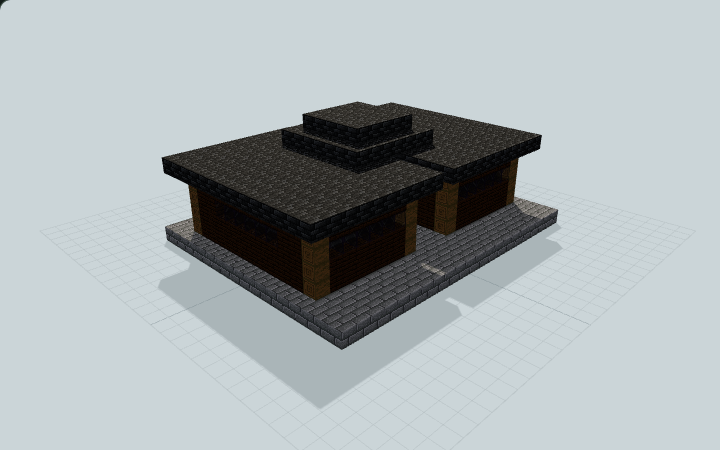 Loading 3D preview…
Minecraft Java Edition · Sponge .schem
Verification details
No revision-bound verification record is currently published for this build.
A 3D preview shows appearance, not game behavior. Bedrock conversion and Litematica compatibility are not verified unless separately recorded.
Tend the Shaded Beds Manually
Two separated soil beds and reachable side aisles provide a sheltered manual garden with a central service area.
- 1
Prepare a level site
Place the 21 by 17 foundation on level ground. Keep the north entry and central passage clear; the two side openings lead to separate garden wings.
- 2
Tend the two beds
Tend the mycelium and podzol beds from their three-wide side aisles. Six small red and brown mushrooms are placed as accents; bring your own extra plants and tools.
- 3
Use the service area
Supply the two empty service-room barrels yourself and use the central crafting table by hand. Opaque roofs and upper tinted windows provide geometric shielding; keep added lights outside the bed zones.
Six small mushrooms are placed on mycelium or podzol; barrels are empty. No Minecraft light-level measurement, growth rate, yield, automatic harvesting or native growth guarantee is claimed; renderer daylight is visual evidence only.
Build Facts
JSON fact sheet- Dimensions
- 21 x 11 x 17 blocks
- Compiled blocks
- 1,016
- Category
- other
- Updated
Curated by MinePilot from a CraftDAG component plan. Canonical page: https://www.myminepilot.com/builds/shaded-mushroom-cultivation-shed
Materials
1,016 blocksPlaced block counts · stack equivalents, not crafting ingredients. Expand for exact BlockStates.
 Deepslate Tiles354Placed blocks
minecraft:deepslate_tiles× 354 Stone Bricks3275×64 + 7
minecraft:stone_bricks× 327 Dark Oak Planks2193×64 + 27
minecraft:dark_oak_planks× 219Stripped Spruce Log4848 / 64 stack
minecraft:stripped_spruce_log× 48Tinted Glass2727 / 64 stack
minecraft:tinted_glass× 27Mycelium15Placed blocks
minecraft:mycelium[snowy=false]× 15Podzol15Placed blocks
minecraft:podzol[snowy=false]× 15Brown Mushroom3Placed blocks
minecraft:brown_mushroom× 3Red Mushroom3Placed blocks
minecraft:red_mushroom× 3 Barrel22 / 64 stack
minecraft:barrel[facing=north,open=false]× 2 Spruce Door22 / 64 stack
minecraft:spruce_door[facing=north,half=lower,hinge=left]× 1minecraft:spruce_door[facing=north,half=upper,hinge=left]× 1Crafting Table11 / 64 stack
minecraft:crafting_table× 1Layer Guide
8 layersImport Guide
Java Edition- Download the protected
.schemfile for Twin-Wing Shaded Mushroom Shed. - Place it in your WorldEdit or Litematica schematics folder.
- Load the schematic in-game, preview placement, then paste or build layer by layer.
Finding related builds…


