
Shoreline Fishing Gear Locker
A land-side timber locker pairs a ladder-accessed net display loft with manual gear barrels and a sheltered bait bench, built for fishing-supply storage on shore.
WorldEdit .schem available. No native .litematic file for this build.
3D Preview
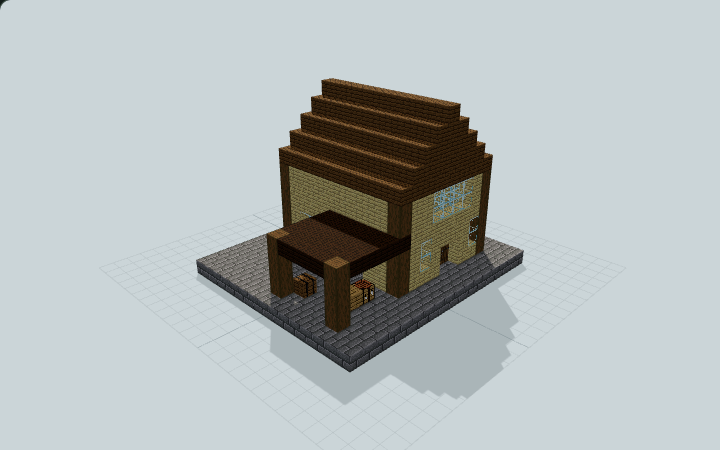 Loading 3D preview…
Minecraft Java Edition · Sponge .schem
Verification details
No revision-bound verification record is currently published for this build.
A 3D preview shows appearance, not game behavior. Bedrock conversion and Litematica compatibility are not verified unless separately recorded.
Manual fishing gear storage
A land-only gear room, rear display loft and low side work awning support your own fishing routine.
- 1
Place and stock on land
Place the entire stone pad on level land. Enter the north double doors and add your own rods and supplies to the empty barrels.
- 2
Reach the rear loft
From the gear room, use the backed ladder on the rear wall. Step east onto the upper landing; keep the ladder hole and loft walkway clear.
- 3
Prepare supplies manually
Use the side door and covered bait bench for manual preparation. Net-style cobweb panels are decorative blocks, not a vanilla fishing-net item.
No rods, bait inventory, boats, fish, entities or automatic fishing mechanism are supplied. The land pad includes no dock or jetty. Static ladder and player-clearance checks do not constitute native Minecraft climbing validation.
Build Facts
JSON fact sheet- Dimensions
- 17 x 12 x 15 blocks
- Compiled blocks
- 827
- Category
- other
- Updated
Curated by MinePilot from a CraftDAG component plan. Canonical page: https://www.myminepilot.com/builds/shoreline-fishing-gear-locker
Materials
827 blocksPlaced block counts · stack equivalents, not crafting ingredients. Expand for exact BlockStates.
 Spruce Planks3024×64 + 46
minecraft:spruce_planks× 302 Stone Bricks2553×64 + 63
minecraft:stone_bricks× 255 Birch Planks1652×64 + 37
minecraft:birch_planks× 165 Dark Oak Planks3434 / 64 stack
minecraft:dark_oak_planks× 34Stripped Spruce Log3131 / 64 stack
minecraft:stripped_spruce_log[axis=y]× 31 Glass1616 / 64 stack
minecraft:glass× 16 Spruce Door66 / 64 stack
minecraft:spruce_door[facing=east,half=lower,hinge=left]× 1minecraft:spruce_door[facing=east,half=upper,hinge=left]× 1minecraft:spruce_door[facing=north,half=lower,hinge=left]× 1minecraft:spruce_door[facing=north,half=lower,hinge=right]× 1minecraft:spruce_door[facing=north,half=upper,hinge=left]× 1minecraft:spruce_door[facing=north,half=upper,hinge=right]× 1 Barrel44 / 64 stack
minecraft:barrel[facing=west,open=false]× 2minecraft:barrel[facing=east,open=false]× 1minecraft:barrel[facing=north,open=false]× 1Cobweb4Placed blocks
minecraft:cobweb× 4 Ladder44 / 64 stack
minecraft:ladder[facing=north,waterlogged=false]× 4Torch33 / 64 stack
minecraft:wall_torch[facing=east]× 2minecraft:wall_torch[facing=west]× 1 Oak Planks22 / 64 stack
minecraft:oak_planks× 2Crafting Table11 / 64 stack
minecraft:crafting_table× 1Layer Guide
12 layersImport Guide
Java Edition- Download the protected
.schemfile for Shoreline Fishing Gear Locker. - Place it in your WorldEdit or Litematica schematics folder.
- Load the schematic in-game, preview placement, then paste or build layer by layer.
Finding related builds…


