Roman Oculus Rotunda
A Roman-inspired rotunda with one hemispherical dome, an open oculus, recessed radial niches and a columned pediment portico. Built for creative forum exhibits.
WorldEdit .schem available. No native .litematic file for this build.
3D Preview
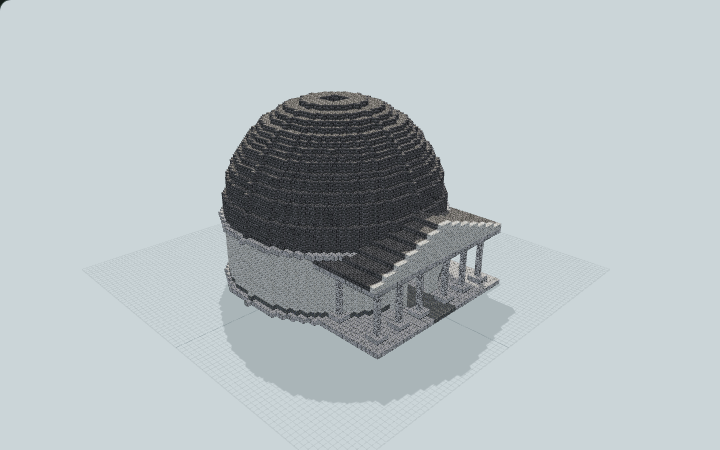 Loading 3D preview…
Minecraft Java Edition · Sponge .schem
Verification details
No revision-bound verification record is currently published for this build.
A 3D preview shows appearance, not game behavior. Bedrock conversion and Litematica compatibility are not verified unless separately recorded.
Quick Start
Explore an original Roman-inspired rotunda with a sky-open center and seven radial wall recesses. This decorative landmark suits creative forums and exhibit spaces.
- 1
Enter from the north
Place the circular foundation at ground level. Walk through the broad central portico gap and continue through the seven-block-wide north entrance.
- 2
Visit the open center
Continue directly into the round chamber beneath the oculus. The roof opening is deliberately unglazed, so rain and daylight can enter.
- 3
Explore the niches
Walk from the open chamber into the seven recessed wall niches. The roof and upper cornices are decorative and have no advertised player route.
Build Facts
JSON fact sheet- Dimensions
- 63 x 39 x 57 blocks
- Compiled blocks
- 22,008
- Category
- large build
- Updated
Curated by MinePilot from a CraftDAG component plan. Canonical page: https://www.myminepilot.com/builds/roman-oculus-rotunda
Materials
22,008 blocksPlaced block counts · stack equivalents, not crafting ingredients. Expand for exact BlockStates.
 Stone Bricks12,208190×64 + 48
minecraft:stone_bricks× 12,208Calcite6,18896×64 + 44
minecraft:calcite× 6,188Polished Diorite3,122Placed blocks
minecraft:polished_diorite× 3,122 Polished Andesite400Placed blocks
minecraft:polished_andesite× 400Diorite90Placed blocks
minecraft:diorite× 90Layer Guide
39 layersShowing the first 12 layers. Open the playground for the full interactive layer slider.
Import Guide
Java Edition- Download the protected
.schemfile for Roman Oculus Rotunda. - Place it in your WorldEdit or Litematica schematics folder.
- Load the schematic in-game, preview placement, then paste or build layer by layer.
Finding related builds…