
Greek Retained Open-Air Theater
A standalone Greek-inspired open-air theater with retained masonry seating, twin end stairs and an open orchestra. Built for server concerts and classical events.
WorldEdit .schem available. No native .litematic file for this build.
3D Preview
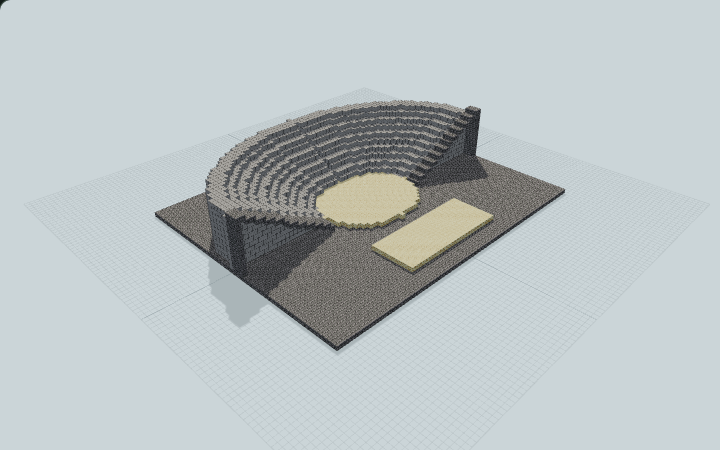 Loading 3D preview…
Minecraft Java Edition · Sponge .schem
Verification details
No revision-bound verification record is currently published for this build.
A 3D preview shows appearance, not game behavior. Bedrock conversion and Litematica compatibility are not verified unless separately recorded.
Quick Start
Place a self-contained masonry theater on a flat site; no hillside is needed.
- 1
Enter the performance area
Set the broad masonry foundation at ground level. Approach from either end of the open front to reach the sandstone orchestra and low rectangular stage.
- 2
Reach the audience terraces
Use either three-block-wide end stair to climb the retained seating fan. The one-block terrace rises connect all exposed seating cells.
- 3
Hold an outdoor event
Perform on the broad sandstone stage; the open orchestra separates performers from the semicircular audience seating.
This is a standalone Greek-inspired architectural theater. It includes its retaining fill and has no generated hill, enclosed arena or suspended canopy.
Build Facts
JSON fact sheet- Dimensions
- 69 x 15 x 55 blocks
- Compiled blocks
- 13,558
- Category
- large build
- Updated
Curated by MinePilot from a CraftDAG component plan. Canonical page: https://www.myminepilot.com/builds/greek-hillside-theater
Materials
13,558 blocksPlaced block counts · stack equivalents, not crafting ingredients. Expand for exact BlockStates.
 Smooth Stone8,942Placed blocks
minecraft:smooth_stone× 8,942 Stone Bricks3,99362×64 + 25
minecraft:stone_bricks× 3,993 Sandstone6239×64 + 47
minecraft:sandstone× 623Layer Guide
13 layersShowing the first 12 layers. Open the playground for the full interactive layer slider.
Import Guide
Java Edition- Download the protected
.schemfile for Greek Retained Open-Air Theater. - Place it in your WorldEdit or Litematica schematics folder.
- Load the schematic in-game, preview placement, then paste or build layer by layer.
Finding related builds…


