Baby Mob Stack
A tall, playful landmark for a creative world or server display.
- Minecraft Java
- Sponge .schem
- 25 × 35 plot · 43 high
WorldEdit .schem available. No native .litematic file for this build.
Animal sculpture
- Placed blocks
- 9,368
- Material families
- 12
Choose an available file, then follow the import guide below.


Interactive 3D
Orbit the model here. For spatial layer inspection, open the 3D Playground.
Four animals, one stack
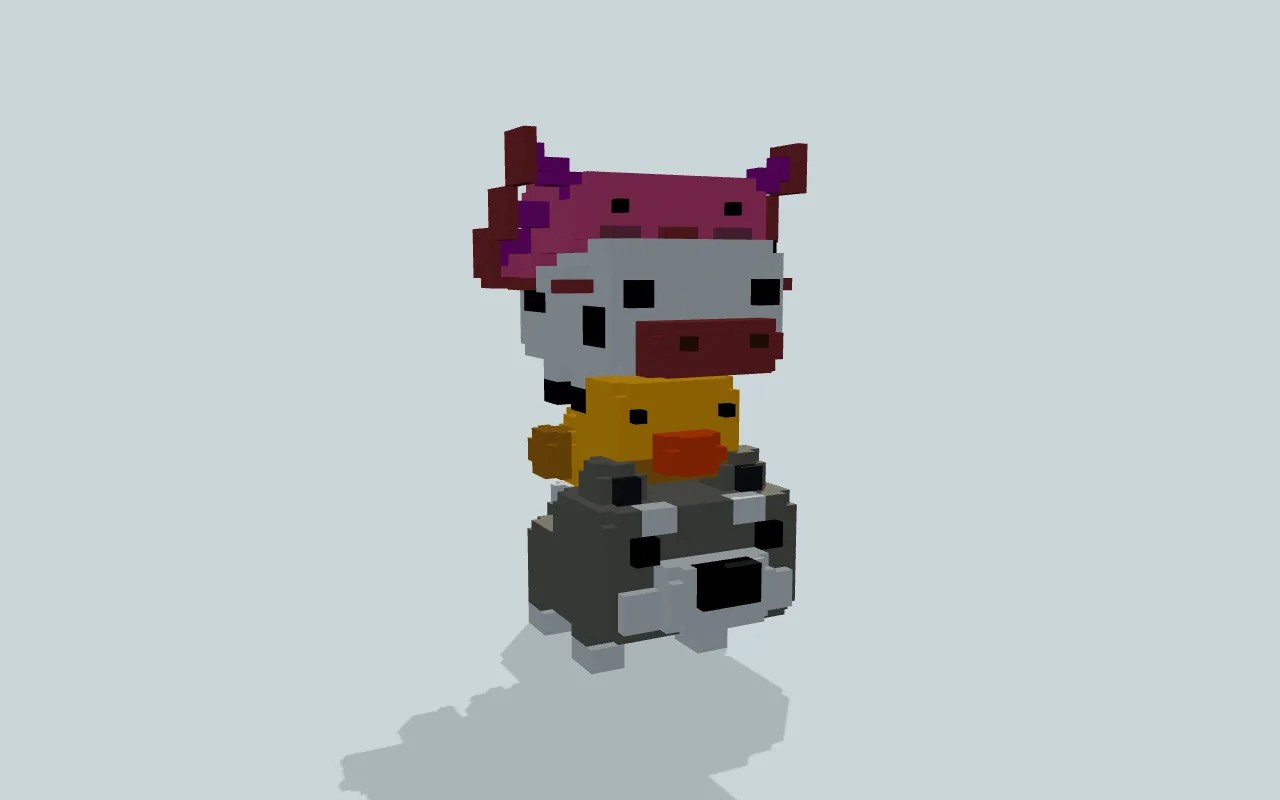
A baby wolf carries a yellow chick, a black-and-white calf and a pink axolotl in one connected sculpture. Oversized heads and short legs give each tier a young, toy-like shape.
The wolf forms the broad base with gray fur, pale cheeks and a dark nose. Above it, a smaller yellow chick nestles beneath the calf. The pink axolotl finishes the silhouette with a wide face, branching side gills and a finned tail.
Concrete and terracotta keep the color boundaries crisp. View the sculpture from the front to see the four faces together, then walk around it to read the separate bodies and tails.
Human reviewed through MinePilot’s existing review workflow.
Fit and import
- Reserve a clear 25-block-wide by 35-block-long footprint with 43 blocks of vertical clearance on a level display site. Leave extra room around it for viewing.
- Use the Minecraft Java Sponge .schem file with a compatible schematic importer. Start in a backup or test world and check the placement before adding it to an existing build.
Choose an available file above and complete its protected download. Follow the import guide for your tool, start in a backup world and inspect the paste origin before placing the build.
This is a static block sculpture, not live mobs or an accessible building. Native in-game import and a Minecraft version matrix have not been tested.
Materials & layers
9,368 placed blocks across 12 material families. Counts group orientation and state variants; they are placed positions, not crafting recipes. Beds and doors occupy multiple positions.
| Material | Placed |
|---|---|
| Light Gray Concrete | 2,787 |
| White Concrete | 2,593 |
| Pink Concrete | 1,724 |
| Yellow Concrete | 1,147 |
| Black Concrete | 389 |
| Pink Terracotta | 333 |
All 12 material families and exact states
Placed block counts · stack equivalents, not crafting ingredients. Expand for exact BlockStates.
 Light Gray Concrete2,78743×64 + 35
minecraft:light_gray_concrete× 2,787 White Concrete2,59340×64 + 33
minecraft:white_concrete× 2,593Pink Concrete1,72426×64 + 60
minecraft:pink_concrete× 1,724Yellow Concrete1,14717×64 + 59
minecraft:yellow_concrete× 1,147 Black Concrete3896×64 + 5
minecraft:black_concrete× 389Pink Terracotta3335×64 + 13
minecraft:pink_terracotta× 333Yellow Terracotta1402×64 + 12
minecraft:yellow_terracotta× 140Orange Concrete971×64 + 33
minecraft:orange_concrete× 97Magenta Concrete961×64 + 32
minecraft:magenta_concrete× 96Magenta Terracotta4848 / 64 stack
minecraft:magenta_terracotta× 48 Gray Concrete1212 / 64 stack
minecraft:gray_concrete× 12Brown Concrete22 / 64 stack
minecraft:brown_concrete× 2Layer overview · 12 of 43 occupied layers
Y is relative to the schematic. These are sampled material counts, not a spatial placement map. Use the 3D Playground for positions.
- Y=0: 48 placed blocks · White Concrete 48
- Y=1: 48 placed blocks · White Concrete 48
- Y=2: 36 placed blocks · Light Gray Concrete 36
- Y=3: 169 placed blocks · Light Gray Concrete 169
- Y=4: 169 placed blocks · Light Gray Concrete 169
- Y=5: 323 placed blocks · Light Gray Concrete 323
- Y=6: 360 placed blocks · Light Gray Concrete 307, White Concrete 53
- Y=7: 364 placed blocks · Light Gray Concrete 307, White Concrete 57
- Y=8: 363 placed blocks · Light Gray Concrete 301, White Concrete 52, Black Concrete 10
- Y=9: 355 placed blocks · Light Gray Concrete 305, White Concrete 40, Black Concrete 10
- Y=10: 240 placed blocks · Light Gray Concrete 154, White Concrete 44, Orange Concrete 32, Black Concrete 10
- Y=11: 190 placed blocks · Light Gray Concrete 170, Orange Concrete 8, White Concrete 8, Black Concrete 4
31 additional occupied layers are omitted from this lightweight overview.