Historic Harbor Lightship
A walkable navigation landmark for a harbor entrance or a historic waterfront.
- Minecraft Java
- Sponge .schem
- 15 × 41 plot · 30 high
WorldEdit .schem available. No native .litematic file for this build.
Harbor lightvessel
- Placed blocks
- 2,962
- Material families
- 13
Choose an available file, then follow the import guide below.


Interactive 3D
Orbit the model here. For spatial layer inspection, open the 3D Playground.
A beacon carried by a working vessel
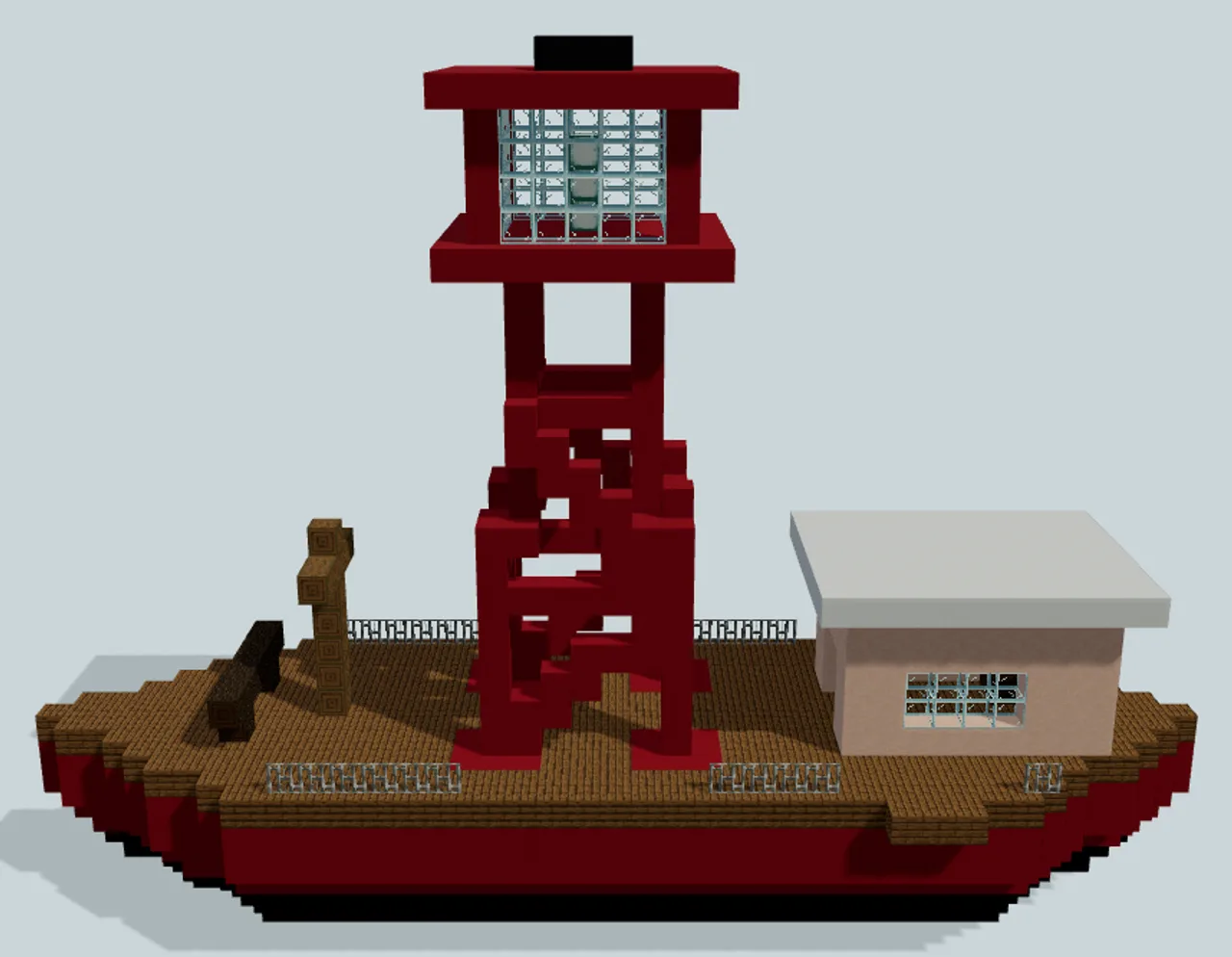
A red working hull carries an open lantern tower above a low cream wheelhouse, keeping the lightvessel silhouette distinct from a sailing ship or passenger ferry.
The black lower strakes widen into red sides and a timber working deck, with separately tapered bow and stern. The lantern is carried on four inclined red legs and open braces, rather than on an enclosed lighthouse shaft. Its broad glazed cage sits well above the aft cabin roof.
The west boarding notch connects the low wheelhouse through an open north-facing entry. A separate checked deck route reaches the bow mooring bitts. These are the advertised access routes: the pointed stern tip is not part of a complete perimeter circuit, and there is no route up to the lantern.
Use it as a fixed harbor marker, museum vessel or maritime roleplay setting. The short forward mast has no sails, and the broad lantern cage, low wheelhouse and exposed deck give it a different job from a cargo brig.
Human reviewed through MinePilot’s existing review workflow.
Fit and import
- Allow a 15-by-41-block footprint and 30 blocks of height, plus the surrounding harbor and an independently built jetty.
- The hull runs north–south. Match the surrounding water surface around local Y3 and preserve the black lower hull beneath it. Leave water depth below the keel rather than placing it on a solid surface.
- Connect a jetty to the west boarding notch at X0–2, Z29–31. Deck player-feet level is Y7; the wheelhouse opening faces north at Z28.
- The download uses Sponge v2 .schem with Minecraft Java DataVersion 3463 (1.20). Native game import and gameplay have not been tested.
Choose an available file above and complete its protected download. Follow the import guide for your tool, start in a backup world and inspect the paste origin before placing the build.
The vessel, beacon and mooring fittings are static. The schematic contains no surrounding sea or jetty, and no rotating light, navigation circuit or tower-access route is claimed. The pointed stern tip is outside the checked walking routes.
Place a fixed harbor lightvessel
Preserve the complete hull and provide your own harbor water and jetty.
- 1
Prepare water depth
Reserve a 15-by-41 footprint and 30 blocks of height. Align the surrounding water surface near local Y3 and leave depth beneath the keel.
- 2
Connect the boarding notch
Build your jetty to the west notch at X0–2, Z29–31. Working-deck player-feet level is Y7.
- 3
Reach the wheelhouse
Follow the west side deck around to the north-facing cabin opening at Z28. Keep the bow route clear.
Static lightship only. No moving vessel, rotating beacon, navigation circuit or lantern-tower access is included.
Materials & layers
2,962 placed blocks across 13 material families. Counts group orientation and state variants; they are placed positions, not crafting recipes. Beds and doors occupy multiple positions.
| Material | Placed |
|---|---|
| Red Concrete | 1,571 |
| Black Concrete | 628 |
| Spruce Planks | 396 |
| Glass | 106 |
| White Terracotta | 105 |
| White Concrete | 99 |
All 13 material families and exact states
Placed block counts · stack equivalents, not crafting ingredients. Expand for exact BlockStates.
 Red Concrete1,57124×64 + 35
minecraft:red_concrete× 1,571 Black Concrete6289×64 + 52
minecraft:black_concrete× 628 Spruce Planks3966×64 + 12
minecraft:spruce_planks× 396 Glass1061×64 + 42
minecraft:glass× 106 White Terracotta1051×64 + 41
minecraft:white_terracotta× 105 White Concrete991×64 + 35
minecraft:white_concrete× 99 Iron Bars2828 / 64 stack
minecraft:iron_bars× 28Stripped Spruce Log1111 / 64 stack
minecraft:stripped_spruce_log× 11 Dark Oak Log99 / 64 stack
minecraft:dark_oak_log× 9 Sea Lantern3Placed blocks
minecraft:sea_lantern× 3 Spruce Slab33 / 64 stack
minecraft:spruce_slab[type=bottom]× 3 Dark Oak Planks22 / 64 stack
minecraft:dark_oak_planks× 2 Lever11 / 64 stack
minecraft:lever[face=floor,facing=north,powered=false]× 1Layer overview · 12 of 30 occupied layers
Y is relative to the schematic. These are sampled material counts, not a spatial placement map. Use the 3D Playground for positions.
- Y=0: 135 placed blocks · Black Concrete 135
- Y=1: 203 placed blocks · Black Concrete 203
- Y=2: 281 placed blocks · Black Concrete 281
- Y=3: 353 placed blocks · Red Concrete 353
- Y=4: 429 placed blocks · Red Concrete 429
- Y=5: 429 placed blocks · Red Concrete 429
- Y=6: 432 placed blocks · Spruce Planks 396, Red Concrete 36
- Y=7: 67 placed blocks · Iron Bars 28, White Terracotta 25, Red Concrete 6, Spruce Slab 3
- Y=8: 42 placed blocks · Glass 13, White Terracotta 12, Red Concrete 8, Dark Oak Log 7
- Y=9: 34 placed blocks · Glass 13, White Terracotta 12, Red Concrete 8, Stripped Spruce Log 1
- Y=10: 39 placed blocks · White Terracotta 28, Red Concrete 10, Stripped Spruce Log 1
- Y=11: 35 placed blocks · White Terracotta 28, Red Concrete 6, Stripped Spruce Log 1
18 additional occupied layers are omitted from this lightweight overview.